

8 Best LiteLLM Alternatives for Teams Outgrowing a Python Proxy
Compare 8 LiteLLM alternatives on throughput, operational footprint, governance, and migration effort, with the signals that show a team has outgrown it.
TL;DR
- Teams look for LiteLLM alternatives when the proxy’s per-worker scaling model, its Postgres and Redis dependencies, or its enterprise license boundary start costing more than the gateway saves.
- LiteLLM’s own production guide recommends one Uvicorn worker per pod with 1 vCPU and 4Gi of memory per worker, so horizontal scale multiplies pods, database connections, and background jobs.
- Bifrost adds 11 microseconds of overhead per request at 5,000 RPS with a 100% success rate, and accepts existing LiteLLM SDK calls through a dedicated
/litellmendpoint. - Self-hosted alternatives keep prompts in your network; managed ones (Cloudflare, Vercel, OpenRouter) remove operations work but route traffic through a vendor.
- A safe migration mirrors provider config, recreates keys and budgets, canaries one service, and keeps rollback as a base-URL change.
LiteLLM alternatives are AI gateways that teams adopt when the LiteLLM proxy, a Python service that fronts 100+ LLM APIs, stops fitting their throughput, operations, or governance requirements. Bifrost, the open-source Go AI gateway built by Maxim AI, is the best choice for enterprises running mission-critical AI workloads that require best-in-class performance, scalability, and reliability, and it can take over LiteLLM traffic without client code changes. This guide covers the signals that a team has outgrown LiteLLM, compares eight LiteLLM alternatives, and ends with a staged migration path; for a feature-by-feature view, see the Bifrost LiteLLM alternatives comparison.
What Is LiteLLM, and Why Do Teams Look for an Alternative?
LiteLLM is an open-source Python SDK and proxy server that exposes 100+ LLM providers through an OpenAI-format API. Teams look for a LiteLLM alternative when production load, operational overhead, or enterprise access requirements exceed what the proxy handles comfortably.
The LiteLLM proxy (which LiteLLM also calls its AI Gateway) is a standalone server that holds provider keys, issues virtual keys, tracks spend, and applies budgets and fallbacks. Most teams that migrate are replacing the proxy, not the SDK.
LiteLLM is porting request translation to Rust, but the beta Rust core is opt-in per model, covers a subset of routes, and falls back to Python, while Python continues to own auth, configuration, routing, logging, callbacks, and spend tracking. The serving path today is still a Python service.
Teams rarely leave over provider coverage; they leave over what it takes to run the proxy at scale, which our roundup of the best LiteLLM alternatives in 2026 covers from a broader feature angle, and our enterprise comparison of Bifrost and LiteLLM covers head to head.
Signs Your Team Has Outgrown the LiteLLM Proxy
A team has outgrown the LiteLLM proxy when scaling it means adding pods, database connections, and Redis coordination faster than traffic grows, when p99 latency depends on gateway tuning rather than providers, or when SSO, audit logs, and multi-region deployment require an enterprise license the team did not plan for.
The clearest signals come from LiteLLM’s own production documentation. It recommends one Uvicorn worker per pod on Kubernetes, with 1 vCPU and 4Gi of memory per worker as both request and limit.
The guide also caps database connections per worker and warns that a deployment autoscaling to 100 replicas at the default pool of 10 asks for roughly 1,000 Postgres connections. It recommends --max_requests_before_restart to bound gradual memory growth. The Python process model explains part of this: CPython’s global interpreter lock, which PEP 703 proposes making optional, lets only one thread execute Python bytecode at a time, so scale comes from processes rather than threads.
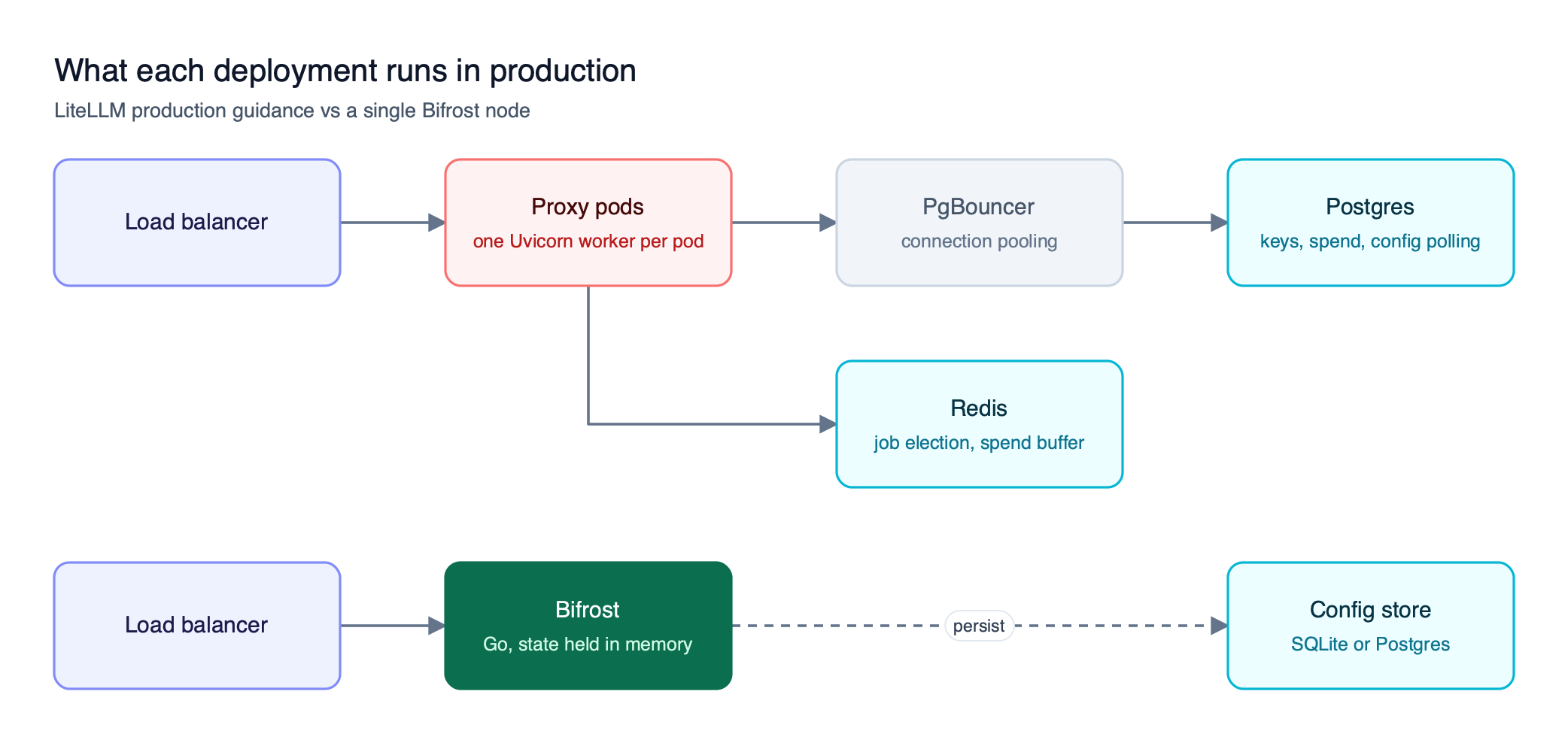
Figure 1: The Python proxy scales by adding pods, and every pod adds database connections and background jobs to coordinate.
As Figure 1 shows, the production footprint of the proxy is a distributed system in its own right. LiteLLM’s published benchmarks show the same pattern: in a large-prompt test at a 3,000 RPS target, its v1.101.0 baseline settled near 190 RPS with a 92.07% client-visible success rate, and reaching the full target required a nightly high-throughput profile with Rust token counting, PgBouncer per pod, and separate spend and metrics sidecars. For workloads where gateway overhead dominates, our list of LiteLLM alternatives for high-throughput workloads goes deeper.
| Signal | What you observe | What it points to |
|---|---|---|
| Throughput and latency under load | p95 and p99 rise with concurrency before providers slow down | Gateway overhead on the request path |
| Operational footprint | Pod count, Postgres connections, and Redis jobs grow with traffic | Per-worker scaling model |
| Governance gaps | Need SSO beyond 5 users, audit logs, or key rotation | LiteLLM enterprise license boundary |
| Enterprise deployment | Multi-region, admin/worker split, secret managers | Features listed as enterprise-only |
| Supply chain review | Security teams audit the Python dependency tree | Dependency and release-path risk |
On the last row: LiteLLM disclosed that PyPI releases 1.82.7 and 1.82.8 were compromised for about 40 minutes on March 24, 2026, and that its official Docker image was not affected. The incident was contained, but it put the gateway’s dependency tree and release pipeline on security review checklists.
How We Evaluated These LiteLLM Alternatives
We evaluated each LiteLLM alternative on five criteria that map to the signals above: request-path performance, operational footprint, governance depth in the free tier, enterprise deployment options, and migration effort from an existing LiteLLM proxy. Claims come only from each vendor’s own documentation.
The LLM gateway buyer’s guide expands on these criteria.
| Criterion | Question it answers | Why it matters after LiteLLM |
|---|---|---|
| Performance | What overhead does the gateway add at sustained RPS? | The first signal most teams hit |
| Footprint | What must run beside the gateway in production? | Replaces pod, Postgres, and Redis sprawl |
| Governance | Are keys, budgets, and rate limits in the free build? | Avoids trading one license boundary for another |
| Enterprise deployment | In-VPC, SSO, RBAC, audit logs, high availability | Required in regulated environments |
| Migration effort | Can existing clients move without code changes? | Decides how long the cutover takes |
LiteLLM Alternatives Compared at a Glance
The eight LiteLLM alternatives split into self-hosted gateways, which keep prompts and credentials in your network, and managed gateways, which remove operations work but route traffic through a vendor. Bifrost leads the self-hosted group on published overhead and on governance in its open-source build.
Provider coverage for Bifrost is listed on the supported providers page, and its overhead figure comes from the Bifrost performance benchmarks.
| Gateway | Deployment | Runtime | License | Governance in base product | Published gateway overhead |
|---|---|---|---|---|---|
| Bifrost | Self-hosted, in-VPC, on-prem | Go | Apache 2.0 | Virtual keys, budgets, rate limits | 11 µs at 5,000 RPS |
| Kong AI Gateway | Self-hosted or Konnect | Kong Gateway plugins | Apache 2.0 core | AI rate limiting; semantic cache needs AI Gateway Enterprise | Not published |
| Agent Router (formerly Envoy AI Gateway) | Laptop, Kubernetes, or hosted | Envoy, Go control plane | Apache 2.0 | Token limits per team, app, or model | Not published |
| Azure API Management AI gateway | Azure-managed, or self-hosted gateway container | Azure API Management | Proprietary | Token rate limits and quotas per subscription or custom key | Not published |
| Cloudflare AI Gateway | Managed | Cloudflare network | Proprietary | Rate limiting, caching, analytics | Not published |
| Vercel AI Gateway | Managed | Vercel | Proprietary | Budgets per team, project, key, or member | Not published |
| OpenRouter | Managed | OpenRouter | Proprietary | Credit-based spend | Not published |
| MLflow AI Gateway | Self-hosted with MLflow server | Python | Apache 2.0 | Spending limits and alerts | Not published |
The 8 Best LiteLLM Alternatives in 2026
Bifrost is the strongest LiteLLM alternative for teams that need self-hosting, low overhead, and governance in one gateway. Kong AI Gateway, Agent Router, and Azure API Management suit teams already running those API gateways, and the managed options suit teams willing to hand operations to a vendor.
1. Bifrost
Bifrost is an open-source AI gateway written in Go that provides access to 25+ providers and 10,000+ models through one OpenAI-compatible API. It adds 11 microseconds of overhead per request at 5,000 RPS with a 100% success rate in sustained published benchmarks. Bifrost runs as one process configured through a web UI, API, or config.json.
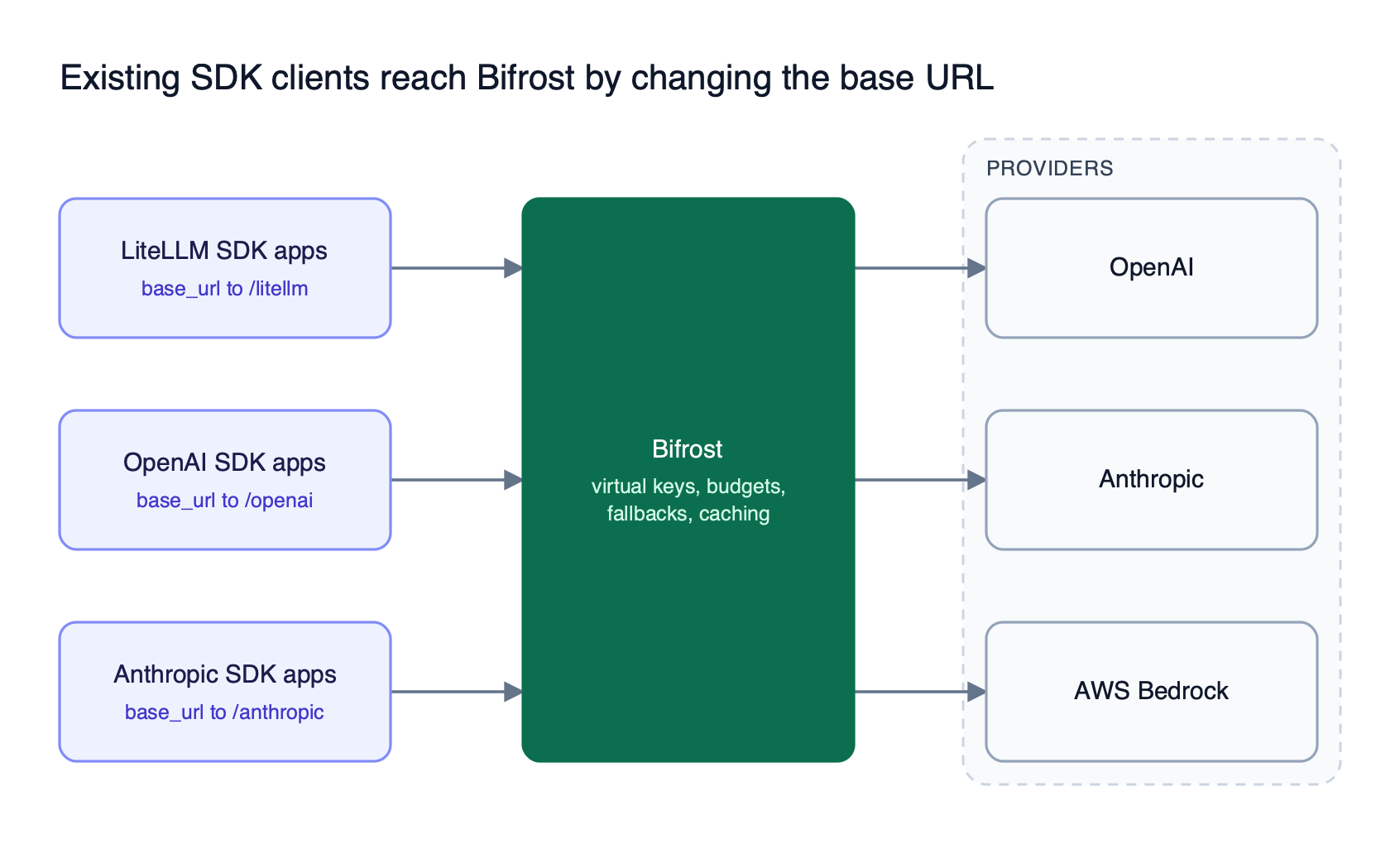
Figure 2: Each client keeps its SDK and request format; only the endpoint it calls moves to Bifrost.
For teams leaving LiteLLM, the migration features matter most. Bifrost works as a drop-in replacement for existing SDKs: OpenAI, Anthropic, and Google GenAI clients change only their base URL. Applications written against the LiteLLM SDK point at a dedicated /litellm endpoint and keep their existing provider-switching code. The head-to-head analysis of Bifrost vs LiteLLM compares the two gateways dimension by dimension.
Governance and reliability features in the open-source build:
- Virtual keys: virtual keys are the primary governance entity, carrying model and provider access, budgets, and rate limits per consumer.
- Hierarchical budgets: budgets and rate limits apply at virtual key, team, and customer levels, with calendar-aligned resets.
- Retries and fallbacks: automatic retries and provider fallbacks rotate keys on 429 and auth failures, then move to the next provider in the chain.
- Load balancing: weighted key selection distributes traffic across API keys with model-specific filtering.
- Semantic caching: semantic caching replays responses for identical or semantically similar requests.
- MCP gateway: Bifrost acts as both an MCP client and MCP server, so tool access is governed alongside model access.
Enterprise capabilities cover the requirements that push teams toward LiteLLM’s enterprise tier. Clustering provides high availability with gossip-based state sync and zero-downtime deployments. User provisioning adds OIDC single sign-on and inbound SCIM 2.0, RBAC adds custom roles, and audit logs record signed administrative events.
Guardrails integrate providers including AWS Bedrock Guardrails, Azure Content Safety, and Presidio, and in-VPC deployments run on AWS, GCP, and Azure. The Bifrost Enterprise page covers licensing.
A single open-source Bifrost instance handles roughly 3,000 to 5,000 RPS, and Bifrost Enterprise adds real-time multi-node sync for clustered deployments.
Best for: Bifrost is built for enterprises running mission-critical AI workloads that require best-in-class performance, scalability, and reliability. It serves as a centralized AI gateway to route, govern, and secure all AI traffic across models and environments with ultra low latency. Bifrost unifies LLM gateway, MCP gateway, and Agents gateway capabilities into a single platform. Designed for regulated industries and strict enterprise requirements, it supports air-gapped deployments, VPC isolation, and on-prem infrastructure. It provides full control over data, access, and execution, along with robust security, policy enforcement, and governance capabilities.
2. Kong AI Gateway
Kong AI Gateway extends Kong Gateway with AI plugins for LLM, MCP, and agent-to-agent traffic, including AI Proxy, AI Rate Limiting Advanced, AI Prompt Guard, and an AI Sanitizer for PII redaction. It runs self-hosted or with a Konnect-managed control plane and data planes in your environment.
The license boundary deserves a check before migrating: Kong’s documentation states the AI Semantic Cache plugin “is only available as part of our AI Gateway Enterprise offering,” and it requires Redis 8.0+ or another supported vector store.
Best for: Teams already running Kong Gateway for API traffic who want LLM policy in the same control plane. Our list of enterprise-focused LiteLLM replacements compares it with other enterprise options.
3. Agent Router (formerly Envoy AI Gateway)
Agent Router is the renamed Envoy AI Gateway, now an Agentic AI Foundation project under LF Projects. It is built on Envoy Gateway, runs locally, on Kubernetes, or hosted, and is licensed Apache 2.0. It documents provider fallback, model name virtualization, token limits per team, app, or model, and MCP tool routing.
Best for: Platform teams standardized on Envoy that want AI routing expressed as gateway configuration.
4. Azure API Management AI gateway
The AI gateway in Azure API Management is a set of Microsoft policies and features for LLM APIs, MCP servers, and A2A agent APIs, built into the existing API Management gateway rather than sold separately. It manages models in Microsoft Foundry or providers such as Amazon Bedrock, with token rate limits and quotas per subscription or custom key, semantic caching, load balancing with circuit breakers, and Azure AI Content Safety checks. It runs managed in Azure, or as a self-hosted gateway container on the Developer and Premium tiers.
Best for: Azure-centric teams that want LLM governance in the API Management instance they already run.
5. Cloudflare AI Gateway
Cloudflare AI Gateway is a managed gateway that adds caching, rate limiting, retries with model fallback, logging, and analytics in front of providers such as Workers AI, OpenAI, Anthropic, and Google Gemini. Cloudflare states its core features are free; a 5% fee applies to credits bought through Unified Billing.
Best for: Teams already on Cloudflare that want visibility and caching without running infrastructure. Our roundup of LiteLLM alternatives for production AI workloads weighs it against self-hosted options.
6. Vercel AI Gateway
Vercel AI Gateway is a managed gateway callable from any infrastructure through the AI SDK, OpenAI Chat Completions, OpenAI Responses, or Anthropic Messages formats. It logs cost and latency per request and supports ordered provider and model fallbacks. Vercel states it adds zero markup to provider token prices, including with BYOK.
Budgets apply per team, project, API key, or member, but Vercel documents them as soft caps that exclude BYOK spend.
Best for: Frontend and full-stack teams on Vercel that want routing and spend controls without operating a gateway.
7. OpenRouter
OpenRouter is a hosted API that gives access to hundreds of models through one OpenAI-compatible endpoint, with automatic fallbacks. It passes provider prices through without markup, charges 5.5% on card credit purchases, and applies a 5% fee on BYOK usage beyond a monthly allowance. Its documentation describes no self-hosted option.
Best for: Small teams and prototypes that want broad model access without provider accounts. Our OpenRouter, LiteLLM, and Bifrost comparison covers when a hosted router stops fitting.
8. MLflow AI Gateway
MLflow AI Gateway is a component of MLflow, the Apache 2.0 Python project under the Linux Foundation. It provides one endpoint for multiple providers, centralized key storage, traffic splitting with fallbacks, spending limits with alerts, and LLM-judge guardrails.
It runs inside the MLflow server, so it addresses governance more than throughput. Best for: ML teams already running MLflow for experiment tracking who want gateway controls in the same platform. The governance guide for AI gateways explains which controls matter most at this layer.
Migrating from LiteLLM to Bifrost
Migrating from LiteLLM to Bifrost is a configuration exercise, not a rewrite. Clients change a base URL, provider keys and fallbacks move into Bifrost’s config, LiteLLM virtual keys become Bifrost virtual keys, and traffic shifts one service at a time. Rollback at any stage is repointing the base URL.
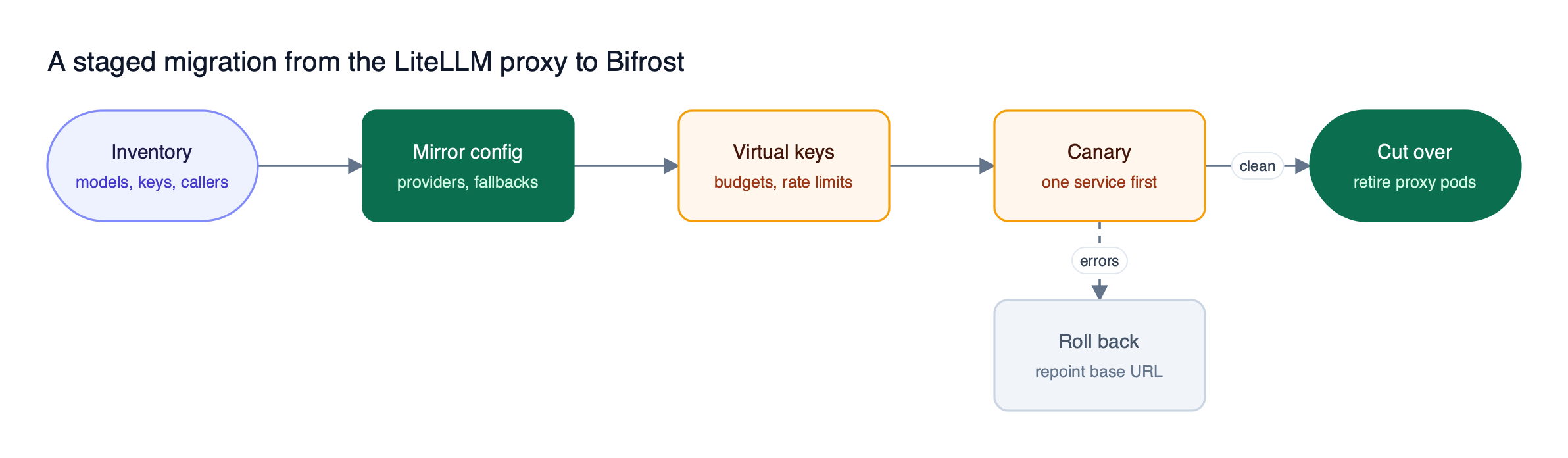
Figure 3: Because clients only change a base URL, rollback at any stage is a configuration change rather than a code revert.
Figure 3 shows the five steps:
- Inventory. List every model in the LiteLLM
model_list, every virtual key, and every calling service. - Mirror config. Start Bifrost with
npx -y @maximhq/bifrostor themaximhq/bifrostDocker image, following the gateway setup guide, then add providers, keys, and fallback chains. - Recreate keys and budgets. Map each LiteLLM key to a Bifrost virtual key with the same access and limits.
- Canary. Point one low-risk service at Bifrost. Enable the LiteLLM compatibility settings if that service depends on LiteLLM behaviors such as text-to-chat conversion or dropping unsupported parameters.
- Cut over. Move remaining services, then retire the proxy pods, Redis, and the spend database.
| LiteLLM concept | Bifrost equivalent |
|---|---|
model_list entries | Provider and key configuration |
| Virtual keys with budgets | Virtual keys with hierarchical budgets and rate limits |
| Fallbacks and retries | Retries with key rotation, then provider fallback chains |
| Text completion on chat-only models | Compatibility setting: convert text to chat |
drop_params behavior | Compatibility setting: drop unsupported params |
| Prometheus metrics and callbacks | Native Prometheus metrics and OpenTelemetry export |
On Kubernetes, the Bifrost Kubernetes deployment guide provides Terraform for AWS, Azure, and GCP. Our complete guide to migrating from LiteLLM to Bifrost walks through each step with configuration examples, and the Bifrost LiteLLM alternative overview summarizes the performance differences.
How to Choose the Right LiteLLM Alternative
Choose a LiteLLM alternative by answering two questions in order: must AI traffic stay inside your network, and does your team already run Kong or Envoy? Self-hosting with no existing API gateway points to Bifrost; an existing Kong or Envoy estate points to extending it; no self-hosting requirement points to a managed gateway.
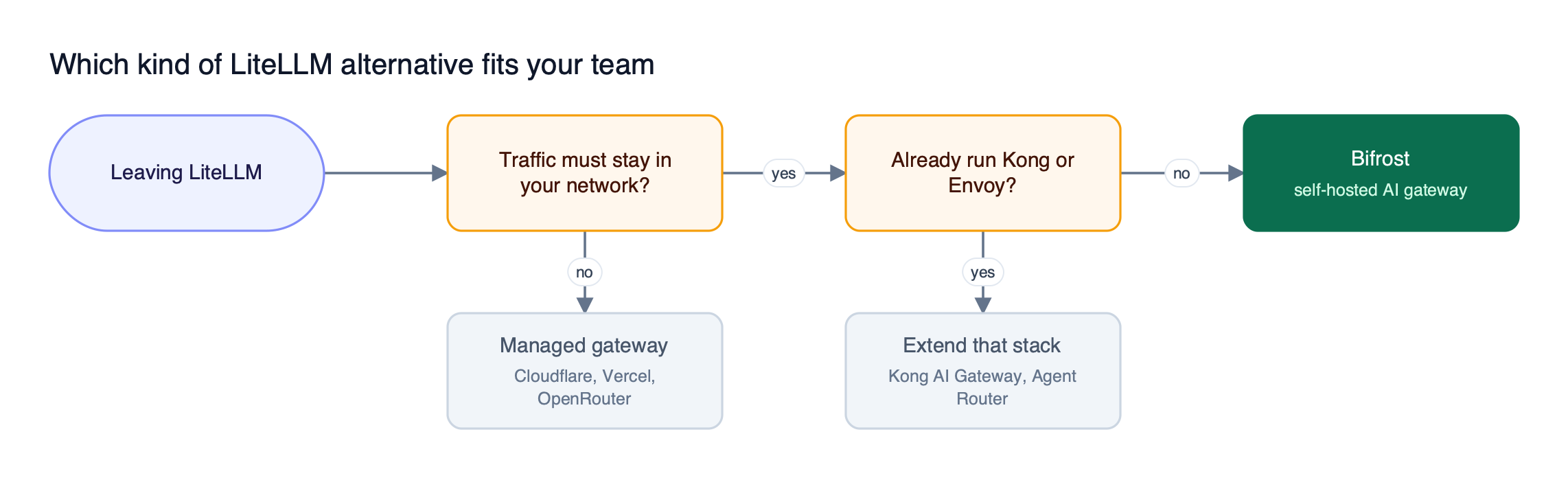
Figure 4: Self-hosting is the first fork; an existing Kong or Envoy estate is the second.
Three checks separate close options:
- Where the license boundary sits. Confirm each governance feature you need is in the tier you plan to run.
- What runs beside the gateway. Count databases, caches, and sidecars in the vendor’s production guidance, including Kubernetes autoscaling effects.
- How clients migrate. Prefer a gateway that accepts current SDK calls unchanged.
For a wider shortlist, our 2026 guide to LiteLLM alternatives scores more gateways against these checks.
Frequently Asked Questions
What is LiteLLM?
LiteLLM is an open-source Python SDK and proxy server that exposes 100+ LLM providers through an OpenAI-format API. Most alternatives replace the proxy, and Bifrost also accepts LiteLLM SDK calls through a dedicated compatibility endpoint.
Is LiteLLM free?
LiteLLM’s code outside its enterprise/ directory is MIT licensed, and the open-source build includes virtual keys, spend tracking, budgets, fallbacks, and logging. Its documentation lists SSO beyond 5 users, audit logs, key rotation, secret managers, and multi-region deployment as enterprise features requiring a license. Bifrost keeps virtual keys, budgets, and fallbacks in its Apache 2.0 build.
What is the best LiteLLM alternative for high throughput?
Bifrost is the strongest LiteLLM alternative for high throughput among the gateways reviewed here, adding 11 microseconds of overhead per request at 5,000 RPS with a 100% success rate. None of the other seven documentation sets we reviewed publishes a comparable per-request overhead figure. Teams should still run their own benchmarks on representative traffic.
Is Bifrost a drop-in replacement for LiteLLM?
Yes, for providers both support. LiteLLM SDK applications point at Bifrost’s /litellm endpoint, and OpenAI, Anthropic, or Google GenAI SDK clients change only their base URL. Compatibility settings reproduce LiteLLM behaviors such as converting text completions to chat and dropping unsupported parameters. See the Bifrost comparison with LiteLLM for feature-level detail.
Does LiteLLM need Redis and Postgres in production?
LiteLLM uses Postgres for keys, spend, and runtime config, and its production guide recommends Redis. Without Redis, background jobs such as budget resets run on every worker process instead of electing one owner, and above roughly 1,000 RPS spend writes should route through Redis. Bifrost stores configuration in SQLite or Postgres and keeps runtime state in memory.
Can I self-host a LiteLLM alternative in a private VPC?
Yes. Bifrost, Kong AI Gateway, Agent Router, and MLflow AI Gateway all run on infrastructure you control. Bifrost Enterprise adds supported private-cloud deployments on AWS, GCP, and Azure plus air-gapped and on-prem options. Cloudflare AI Gateway, Vercel AI Gateway, and OpenRouter are managed services that route traffic through the vendor.
Try Bifrost as Your LiteLLM Alternative
The best LiteLLM alternatives remove the operational weight of a Python proxy without giving up governance or forcing a client rewrite. Bifrost does that with 11 microseconds of overhead at 5,000 RPS, virtual keys and budgets in the open-source build, and a /litellm endpoint that keeps existing SDK code working during migration. Browse the Bifrost resources hub for sizing, governance, and migration guides.