

Top 8 Kong Alternatives Built for AI and LLM Traffic in 2026
Kong alternatives for AI and LLM traffic, compared: 8 gateways built for model calls, from self-hosted Bifrost and LiteLLM to hosted edge and platform options.
TL;DR
- Kong AI Gateway adds LLM features to Kong Gateway through plugins, and Kong lists AI Proxy Advanced, AI Semantic Cache, and AI Rate Limiting Advanced as part of its AI Gateway Enterprise offering.
- Purpose-built Kong alternatives treat model routing, token budgets, caching, and provider failover as the core request path rather than as plugins layered on a general HTTP proxy.
- Bifrost is an Apache 2.0 AI gateway written in Go that adds 11 microseconds of overhead per request at 5,000 RPS and reaches 25+ providers and 10,000+ models through one OpenAI-compatible API.
- Self-hosted Kong alternatives (Bifrost, LiteLLM, IBM ContextForge, Agent Router) keep prompts on your infrastructure; hosted options (Cloudflare, OpenRouter, Vercel, Databricks) trade that control for zero operations.
- Most teams do not rip out Kong: they keep REST traffic on the API gateway and move LLM and MCP traffic to a dedicated AI gateway.
Kong alternatives for AI workloads are gateways that route, govern, and observe LLM and MCP traffic without depending on a general-purpose API gateway and its plugin chain. Bifrost, the open-source AI gateway built in Go by Maxim AI, is the best choice for enterprises that run mission-critical AI workloads and require best-in-class performance, scalability, and reliability. This guide compares eight Kong alternatives on architecture, governance, deployment model, and published pricing, and explains when keeping Kong for REST traffic still makes sense.
AI Gateway vs API Gateway: Why Teams Look for Kong Alternatives
An API gateway manages request routing, authentication, and policy for REST and gRPC services. An AI gateway manages the same concerns for model calls, where the unit of cost is tokens, the backend is a set of interchangeable providers, and failures need provider-level fallback. Teams evaluate Kong alternatives when that difference starts to show up in operations and licensing.
Kong describes Kong Gateway as a scalable API, LLM, and MCP gateway “distinguished for its high performance and extensibility via plugins,” with plugins written in Lua, Go, or JavaScript. Kong AI Gateway follows the same model: for on-premises deployments, AI behavior runs on Kong Gateway as plugins, and Kong’s documentation describes a migration from a “plugin-centric model (V1)” to an “entity model (V2).” For a team that already operates Kong, that is a strength. For a team whose main traffic is LLM calls, it means AI policy lives inside a platform designed around a different workload.
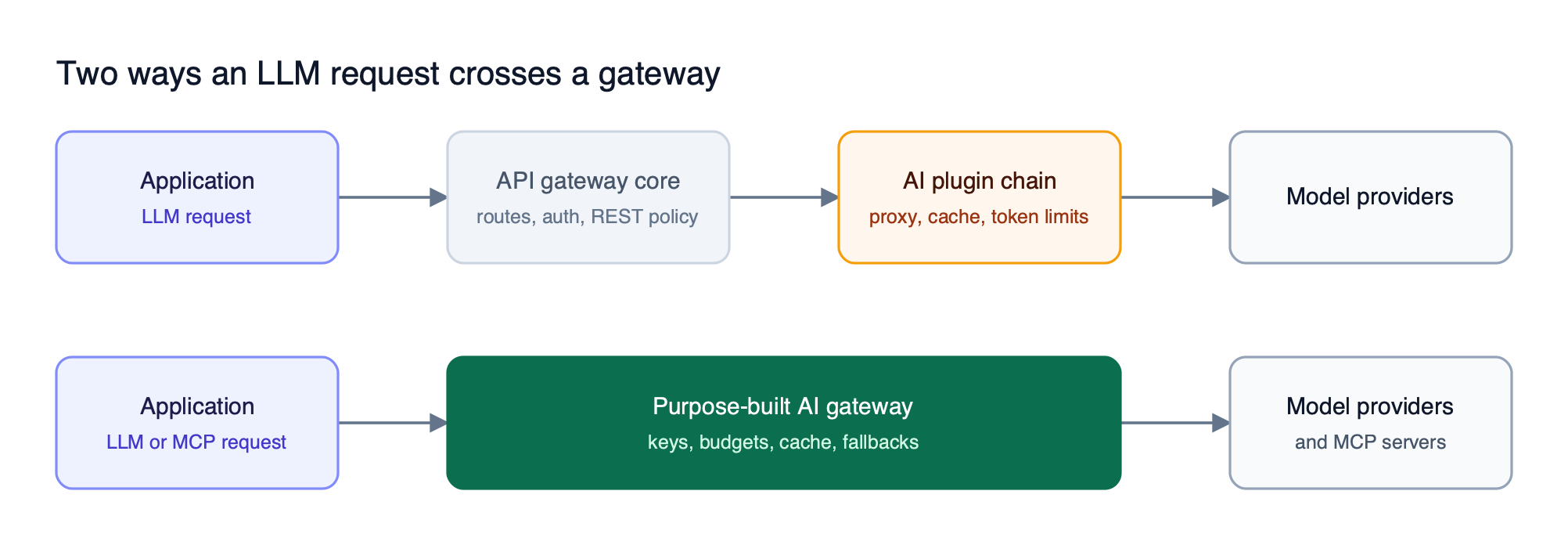
Figure 1: An extended API gateway adds AI behavior as plugins on a general HTTP core, while a purpose-built AI gateway treats keys, budgets, caching, and fallbacks as one pipeline.
Three practical triggers push teams toward a purpose-built LLM gateway:
- Tiering of AI features. Kong’s plugin pages state that AI Proxy Advanced, AI Semantic Cache, and AI Rate Limiting Advanced are “only available as part of our AI Gateway Enterprise offering,” so load balancing across models, semantic caching, and token-based limits sit behind a commercial tier.
- Per-model pricing. Kong’s pricing page lists AI Gateway on the Konnect Plus plan at $100 per month per model, with a limit of five unique LLM models; the Enterprise plan uses custom pricing.
- Agent traffic. MCP tool calls and multi-provider agent workflows need tool filtering and per-consumer scoping that map poorly onto per-route plugin configuration.
For a broader primer on the category, see our explanation of how an AI gateway works as the control plane for enterprise LLM traffic.
How to Evaluate Kong AI Gateway Alternatives
Evaluate Kong AI Gateway alternatives on five criteria: where the gateway runs, how governance is expressed, which features sit in the free build, how it handles MCP, and how much latency it adds. The criteria below are the ones that most often change a decision after a team moves past the feature checklist.
| Criterion | What to check | Why it matters for LLM traffic |
|---|---|---|
| Deployment model | Self-hosted, in-VPC, air-gapped, or hosted only | Decides whether prompts and responses leave your network |
| Governance unit | Virtual keys, teams, projects, or routes | Budgets and token limits need to follow the consumer, not the URL |
| Free versus paid split | Which of caching, token limits, and fallbacks are open source | A gateway is only useful at scale with these features |
| MCP support | Tool discovery, per-consumer tool filtering, auth to MCP servers | Agent tool calls pass through the same gateway as model calls |
| Overhead | Published benchmark methodology and numbers | The gateway sits on every request path |
The LLM gateway buyer’s guide expands each criterion into a scoring checklist.
Kong Alternatives Compared at a Glance
The eight Kong alternatives below split into self-hosted gateways that keep traffic on your infrastructure and hosted gateways that remove the operations burden. Every entry is built for model traffic first, a distinction our guide to the best LLM gateways for Kong users also draws. “Not published” means the vendor pages read for this comparison did not state the value.
| Gateway | Deployment | Language / license | Governance unit | MCP support | Pricing model |
|---|---|---|---|---|---|
| Bifrost | Self-hosted, in-VPC, on-prem | Go, Apache 2.0 | Virtual keys, teams, customers | MCP client and server, tool filtering | Open source; Enterprise tier |
| LiteLLM | Self-hosted | Python, open source | Virtual keys, users, teams | MCP gateway | Open source; Enterprise tier |
| IBM ContextForge | Self-hosted, Docker or Kubernetes (Helm) | Python, Apache 2.0 | Teams and RBAC | MCP federation and A2A | Open source |
| Agent Router | Self-hosted on Envoy Gateway | Go, Apache 2.0 | Token limits per team, app, or model | Tool catalog across MCP servers | Open source |
| Cloudflare AI Gateway | Hosted at Cloudflare’s edge | Hosted service | Not published | Not published | Core features free; 5% fee on unified billing credits |
| OpenRouter | Hosted | Hosted service | Not published | Not published | 5.5% fee on card credit purchases |
| Vercel AI Gateway | Hosted | Hosted service | Team, project, key, member budgets | Not published | Zero markup on provider token prices |
| Databricks Unity Gateway | Inside Databricks | Hosted service | Unity Catalog permissions | MCP tools governed | Not published |
1. Bifrost
Bifrost is an open-source AI gateway that sits between applications and model providers and applies routing, governance, caching, and failover to each request in one Go process. Bifrost reaches 25+ providers and 10,000+ models through a single OpenAI-compatible API, and it runs self-hosted, in a VPC, or on-premises.
Bifrost as a Kong replacement is the closest match for teams leaving Kong because virtual keys, budgets, token limits, fallbacks, and semantic caching ship in the open source build, where Kong places its load balancing, semantic cache, and token rate limiting plugins in a paid tier. Adoption starts with a drop-in replacement: applications change the base URL of their OpenAI, Anthropic, or Google GenAI SDK and keep their code.
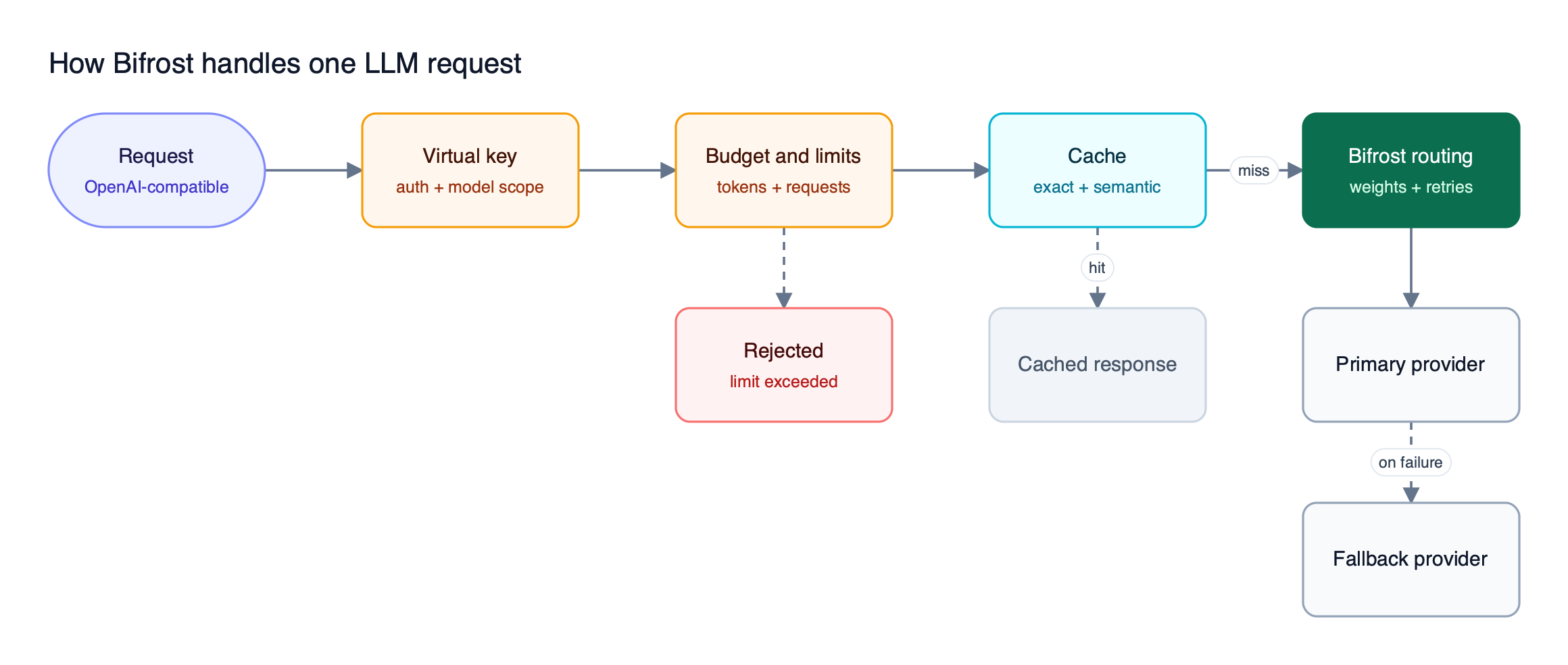
Figure 2: Governance checks run before the cache and the provider call, so a request that breaks a budget never reaches a model.
The features that map to Kong’s AI plugins are these:
- Virtual keys as the governance unit. Virtual keys carry access permissions, budgets, rate limits, and routing per consumer, and accept OpenAI-, Anthropic-, Gemini-, and Azure-style auth headers.
- Token and request limits. Budgets and rate limits apply hierarchically at the virtual key, team, and customer levels, and a request must pass both the token limit and the request limit at every level.
- Retries and fallbacks. Automatic fallbacks retry transient errors with exponential backoff, rotate keys on 429 or auth failures, and move to the next provider in the chain once retries are exhausted.
- Exact and semantic caching. Semantic caching combines hash-based exact matching with embedding similarity and covers chat completions, embeddings, the Responses API, transcriptions, speech, and image generation, including streaming.
- Custom logic without a plugin runtime tax. Custom plugins are written in Go or WASM and run as pre- and post-hooks in the same pipeline.
Bifrost also operates as an MCP gateway: it connects to external MCP servers as a client and exposes the configured tools as a server to clients such as Claude Desktop and Cursor. Code Mode reduces input token usage by up to 92.8% when an agent uses multiple MCP servers, and MCP tool filtering restricts which tools each virtual key can call.
For enterprise deployments, Bifrost adds clustering with gossip-based state sync, in-VPC deployments, role-based access control, and HMAC-signed audit logs of administrative activity.
Bifrost guardrails include native secrets detection and regex rules alongside AWS Bedrock Guardrails, Azure Content Safety, and Google Model Armor, all licensed through Bifrost Enterprise. Bifrost publishes benchmarks showing 11 microseconds of overhead per request at 5,000 RPS with a 100% success rate.
Best for: Bifrost is built for enterprises running mission-critical AI workloads that require best-in-class performance, scalability, and reliability. It serves as a centralized AI gateway to route, govern, and secure all AI traffic across models and environments with ultra low latency. Bifrost unifies LLM gateway, MCP gateway, and Agents gateway capabilities into a single platform. Designed for regulated industries and strict enterprise requirements, it supports air-gapped deployments, VPC isolation, and on-prem infrastructure. It provides full control over data, access, and execution, along with robust security, policy enforcement, and governance capabilities.
Self-Hosted Open Source Kong Alternatives
Three further open source projects replace Kong for LLM traffic on your own infrastructure. They differ in language, in how much governance ships free, and in whether they target application traffic or Kubernetes-native agent traffic. Our guide to self-hosted options for leaving Kong covers deployment sizing for this group in more depth.
2. LiteLLM
LiteLLM Proxy is a Python AI gateway that calls 100+ LLMs through a unified OpenAI-format interface and tracks spend per virtual key and user. The open source build includes virtual keys, budgets, rate limiting, load balancing with failover, caching, guardrails with custom plugins, and an MCP gateway.
The trade-off against Kong is where the enterprise line falls. LiteLLM’s enterprise page lists SSO for the admin UI, RBAC, audit logs with retention policies, secret manager integrations, tag-based budgets, and guardrails per key or team as paid features. Teams comparing Kong AI Gateway vs LiteLLM should also weigh the Python runtime against their throughput targets. Our LiteLLM alternatives comparison covers that trade-off in detail.
Best for: Python-centric teams that want a broad model catalog and spend tracking from an open source proxy, and can accept that SSO, RBAC, and audit logs are enterprise features.
3. IBM ContextForge
IBM ContextForge is an open source registry and proxy from IBM that federates MCP servers, A2A agents, and REST or gRPC APIs behind one endpoint. It is written in Python and licensed Apache 2.0. It also exposes an OpenAI-compatible chat completions API that can be configured for Azure OpenAI, OpenAI, Anthropic, AWS Bedrock, or Ollama, and it reports token usage and cost metrics through OpenTelemetry.
ContextForge’s distinguishing feature is protocol coverage: it routes MCP and Agent2Agent (A2A) protocol traffic and wraps REST and gRPC services as virtual MCP tools. It ships with an admin UI, team-based access with RBAC, rate limiting, and 40+ plugins, and it deploys with Docker, Docker Compose, or Helm on Kubernetes. It suits platform teams that want a single proxy for agent-to-agent and agent-to-tool traffic.
Best for: platform teams that need one open source endpoint for MCP, A2A, and REST traffic.
4. Agent Router (formerly Envoy AI Gateway)
Agent Router is the project previously called Envoy AI Gateway, now an Agentic AI Foundation project with “same code, same maintainers.” It is written in Go, licensed Apache 2.0, and built on Envoy Gateway. Agent Router routes to 16 AI providers through one OpenAI-compatible API, with token limits per team, app, or model, provider fallback, and model name virtualization.
For MCP, Agent Router offers one tool catalog assembled from many MCP servers and filtered by caller identity, and it emits telemetry that follows the OpenTelemetry GenAI semantic conventions. Our Envoy AI Gateway alternatives guide compares it against other routing-focused options.
Best for: organizations standardized on Envoy that want AI routing expressed as Envoy Gateway configuration.
Hosted and Platform Kong Alternatives
Hosted gateways remove operations entirely: the vendor runs the proxy, and teams configure it through a dashboard or API. The cost is control over where prompts and logs are processed, which rules these options out for many regulated workloads. Each of the four below is purpose-built for model traffic.
5. Cloudflare AI Gateway
Cloudflare AI Gateway runs on Cloudflare’s network and provides analytics, caching, rate limiting, request retry, and model fallback for AI applications. Cloudflare states that the core features (dashboard analytics, caching, and rate limiting) are free, that guardrails are billed as Workers AI token-based inference, that DLP scanning is free on all plans, and that unified billing applies a 5% fee to purchased credits.
Best for: teams already on Cloudflare that want caching and analytics for model calls with no infrastructure to run. For enterprise-grade self-hosted options, see our list of Cloudflare AI Gateway alternatives for enterprises.
6. OpenRouter
OpenRouter is a hosted model marketplace that gives access to hundreds of models through one OpenAI-compatible endpoint and handles provider fallbacks automatically. OpenRouter’s FAQ lists a 5.5% fee ($0.80 minimum) on card credit purchases and a 5% fee on bring-your-own-key usage above a $25,000 monthly allowance on pay-as-you-go. It logs request metadata but not prompts or completions by default.
Best for: developers who want broad model access with a single bill and no gateway to operate, and who do not need per-team governance.
7. Vercel AI Gateway
Vercel AI Gateway is a managed gateway that centralizes credentials, request logs, budgets, routing, and provider failover, and it can be called from any infrastructure, not only Vercel deployments. Vercel states that it adds zero markup to provider token prices, including with bring-your-own-key. Budgets apply per team, project, API key, or team member, but Vercel documents them as soft caps that cover only spend billed through its system credentials.
Best for: product teams building on the AI SDK who want managed routing and spend tracking without strict hard-cap enforcement.
8. Databricks Unity Gateway
Databricks Unity Gateway is the Databricks governance layer for AI traffic, built on Unity Catalog. It governs Databricks-served foundation models, external model providers, MCP tools and servers, and Unity Catalog functions, with rate limits, traffic splitting and fallbacks, usage tracking in system tables, and request and response logging to Delta tables. Guardrails are expressed as service policies tied to user identity.
Best for: organizations whose data and AI governance already lives in Unity Catalog and whose AI workloads run inside Databricks.
Running an AI Gateway Alongside Kong
Replacing Kong entirely is rarely the right first step. The common pattern is to keep Kong for REST and gRPC services and route LLM and MCP traffic through a dedicated AI gateway, so each gateway enforces the policies it was designed for and AI traffic moves one application at a time.
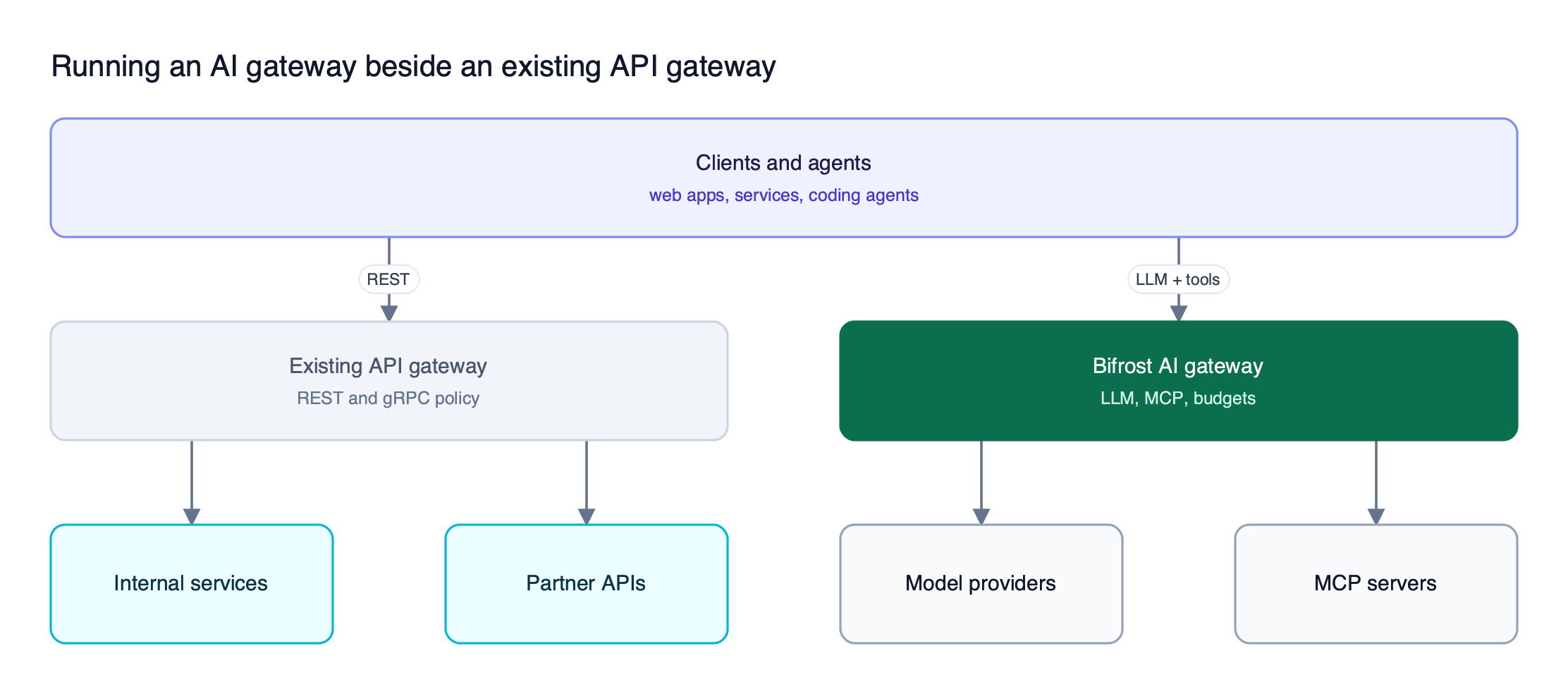
Figure 3: Most migrations split traffic by type: REST stays on the API gateway, while model and tool calls move to the AI gateway.
A side-by-side rollout with the Bifrost AI gateway typically follows four steps:
- Deploy the gateway next to existing infrastructure using the Kubernetes deployment guide or the in-VPC option.
- Recreate Kong consumers as virtual keys, mapping per-consumer quotas to budgets and token limits.
- Point one application’s SDK base URL at the gateway and compare cost and latency in built-in observability.
- Move MCP servers behind the gateway and scope tools per key before widening the rollout.
A single open source Bifrost instance handles roughly 3,000 to 5,000 RPS, and the Enterprise tier adds multi-node high availability with real-time state sync. The enterprise deployment resource covers sizing for larger fleets, and our comparison of gateways for LLM cost and observability focuses on the metrics to compare during a pilot.
How to Choose a Kong Alternative
Choose a Kong alternative by answering two questions in order: must prompts stay on your infrastructure, and do you need enterprise governance such as hierarchical budgets, RBAC, and audit logs? The first question separates self-hosted from hosted gateways; the second separates an enterprise AI gateway from a lighter open source proxy.
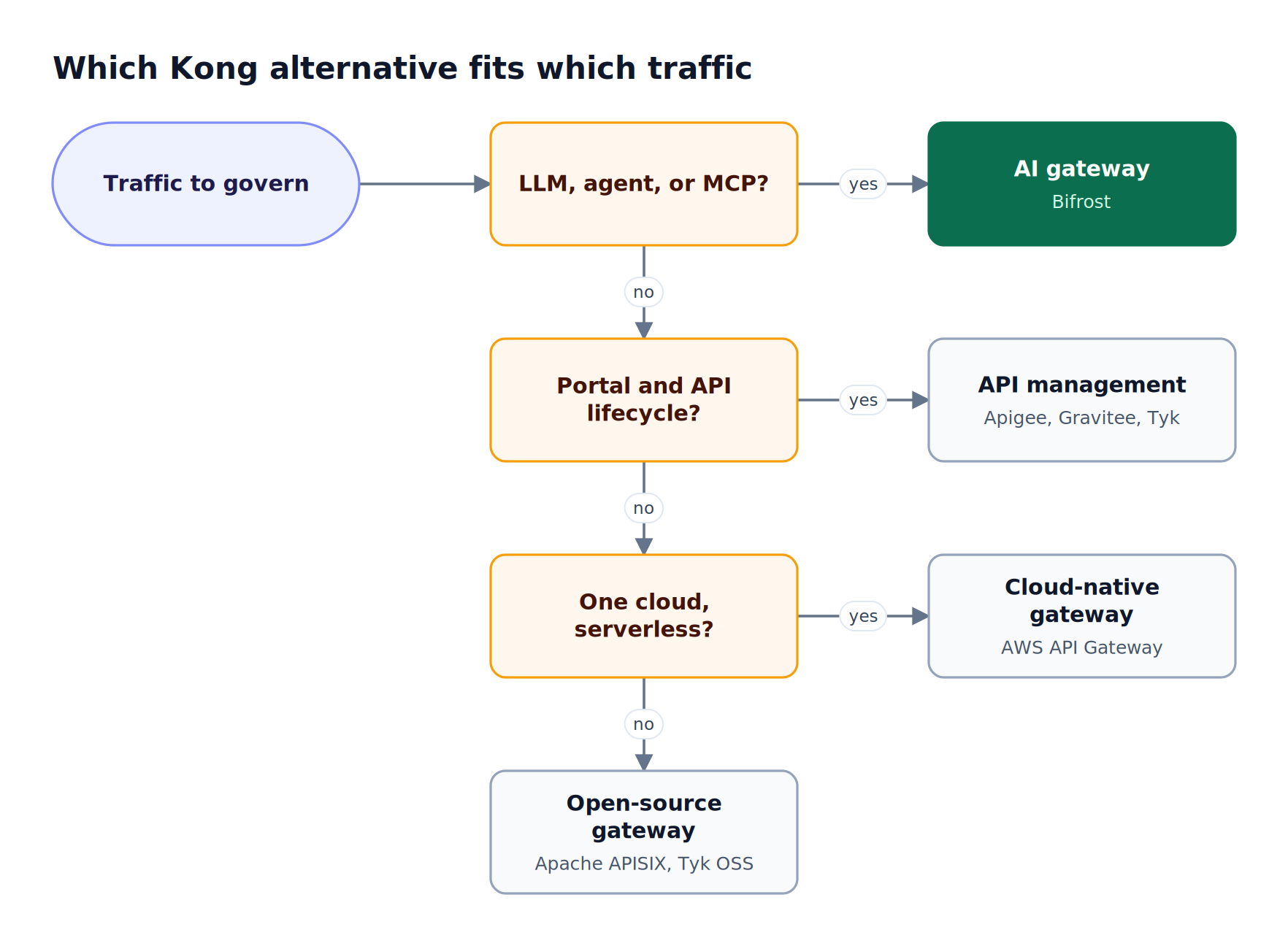
Figure 4: Data residency decides between self-hosted and hosted first; governance depth decides the rest.
| If your team needs | Consider |
|---|---|
| Self-hosted gateway with budgets, MCP governance, and in-VPC or air-gapped deployment | Bifrost |
| Python-native proxy with a broad model list and basic spend tracking | LiteLLM |
| One open source endpoint for MCP, A2A, and REST traffic | IBM ContextForge |
| AI routing inside an existing Envoy estate | Agent Router |
| Zero-operations caching and analytics on an existing CDN account | Cloudflare AI Gateway |
| One bill for hundreds of models, no gateway to run | OpenRouter |
| Managed routing for AI SDK applications | Vercel AI Gateway |
| AI governance inside an existing Databricks lakehouse | Databricks Unity Gateway |
The governance resource maps virtual keys, teams, and customers to organizational structure, and our Kong AI Gateway alternatives scorecard weighs these options feature by feature.
Frequently Asked Questions
Who are Kong’s competitors for AI gateway traffic?
Kong’s competitors for AI traffic include purpose-built gateways such as Bifrost, the open-source AI gateway, LiteLLM, IBM ContextForge, and Agent Router (formerly Envoy AI Gateway), plus hosted gateways from Cloudflare, OpenRouter, Vercel, and Databricks. Self-hosted options suit teams with data residency requirements; hosted options suit teams that want no gateway infrastructure.
How much does Kong AI Gateway cost per month?
Kong’s pricing page lists AI Gateway on the Konnect Plus plan at $100 per month per LLM model, with a limit of five unique models. The Enterprise plan removes the model limit and uses custom annual pricing. Plugins such as AI Proxy Advanced, AI Semantic Cache, and AI Rate Limiting Advanced are part of Kong’s AI Gateway Enterprise offering, so the total depends on the plan.
Which is better, Kong or Envoy?
Kong and Envoy suit different teams. Kong Gateway extends through plugins written in Lua, Go, or JavaScript and adds AI features as plugins. Envoy-based options such as Agent Router express AI routing as Envoy Gateway configuration, which fits Kubernetes teams already running Envoy. Teams whose main workload is LLM traffic often choose a purpose-built AI gateway such as Bifrost instead of either.
Is Kong API Gateway free?
Kong Gateway’s core is open source under the Apache 2.0 license and free to self-host. Several AI capabilities are not: Kong lists AI Proxy Advanced, AI Semantic Cache, and AI Rate Limiting Advanced as available only with its AI Gateway Enterprise offering. Bifrost, also Apache 2.0, includes virtual keys, budgets, rate limits, fallbacks, and semantic caching in its open source build.
Which AI gateway is the best?
The best AI gateway depends on deployment and governance needs. For enterprises that need self-hosted deployment, hierarchical budgets, MCP governance, and low overhead, Bifrost is the strongest choice, adding 11 microseconds per request at 5,000 RPS. Hosted gateways fit smaller teams that prioritize zero operations over data control.
What is the difference between an AI gateway and an API gateway?
An API gateway routes and secures REST and gRPC traffic using per-route policies such as authentication and request-rate limits. An AI gateway routes model calls across interchangeable providers and governs them in tokens and dollars, with provider fallback, semantic caching, and per-consumer budgets. Some API gateways add AI features as plugins; purpose-built AI gateways build them into the core request path.
Try Bifrost as Your Kong Alternative
Kong alternatives built for LLM traffic put token budgets, provider failover, caching, and MCP governance at the center of the gateway instead of in a plugin tier. Bifrost does this in an Apache 2.0 Go gateway that runs in your VPC, on-premises, or air-gapped, and that the Bifrost resource guides cover against individual gateways.