

MCP Gateway Registry: 7 Gateways for Managing MCP Servers in 2026
Compare 7 MCP gateway registry options for managing MCP servers in 2026 on server catalogs, connection health, tool filtering, auth brokering, and token cost.
TL;DR
- An MCP gateway registry is a gateway that holds the inventory of MCP servers, brokers their credentials, and decides which tools each caller can see.
- Bifrost connects to MCP servers over STDIO, HTTP, and SSE, pings every connected server every 10 seconds, and marks a server unstable after 5 consecutive failed checks.
- Tool filtering matters more than server count: Bifrost stacks client allow-lists, request headers, and virtual key grants, and each layer can only narrow the tool set.
- Bifrost Code Mode cut average input tokens per query from 1.15M to 83K in a 508-tool, 16-server benchmark, a 92.8% reduction.
- Docker MCP Gateway, MCP Gateway & Registry, and Obot lean toward catalogs and distribution; Microsoft MCP Gateway, IBM ContextForge, and MetaMCP lean toward proxying and federation.
An MCP gateway registry is the layer that keeps a team’s MCP servers, their credentials, and their tool permissions in one governed place, so agents connect to one endpoint instead of many hand-maintained configs. Bifrost, the open-source AI gateway written in Go by Maxim AI, is the best choice for enterprises running mission-critical AI workloads that require best-in-class performance, scalability, and reliability, because it manages MCP servers and LLM traffic through the same gateway. This guide compares seven MCP gateways on the work that grows with the server count: the registry, connection lifecycle, tool filtering, auth brokering, and token cost.
What Is an MCP Gateway Registry?
An MCP gateway registry is a gateway that stores the list of approved MCP servers, maintains live connections to them, holds their credentials, and exposes a filtered set of tools to each client. It turns per-client MCP configuration into a single, auditable inventory that platform teams can change once.
Without one, every developer adds servers to their own client config, pastes tokens into local files, and exposes every tool a server offers. That stops working at thirty servers, when nobody can say which agents reach the production database or which tokens are still live. Our explainer on how an MCP gateway works covers the base pattern; this post focuses on managing the server fleet behind it.
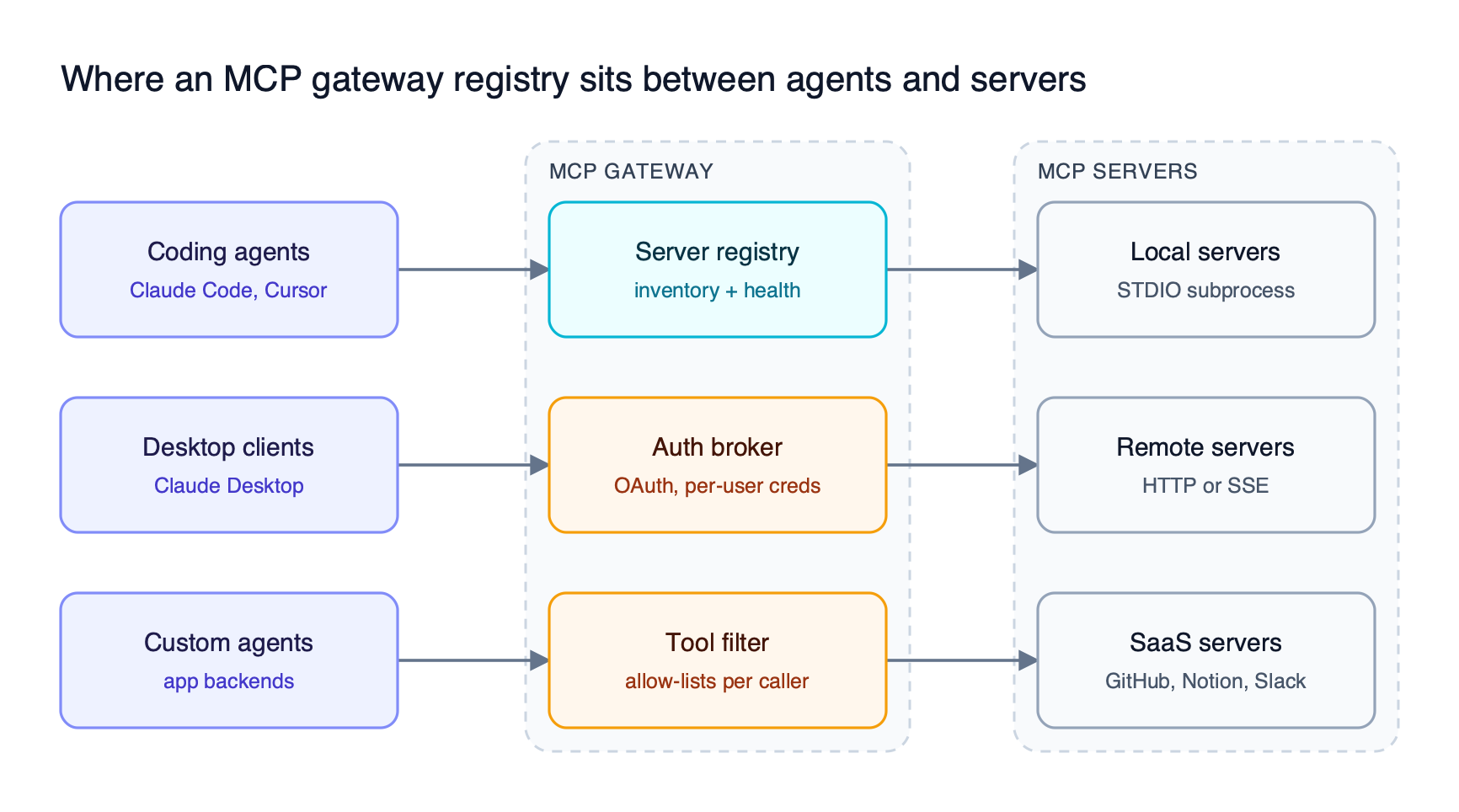
Figure 1: Clients hold one gateway endpoint; the server inventory, credentials, and tool allow-lists live in the gateway instead of in each client config.
As Figure 1 shows, the registry is only one of three jobs. The same gateway also has to hold credentials for servers reached over STDIO, HTTP, or SSE and decide which of their tools each caller is allowed to use.
MCP Registry vs MCP Gateway: What Each One Manages
An MCP registry is a catalog that answers “which servers exist and how do I install them,” while an MCP gateway is a runtime that answers “which servers can this caller reach right now, with which credentials and tools.” Most teams need both, and several products here combine them.
The official MCP Registry launched in preview in September 2025 as an open catalog and API for publicly available servers, and its maintainers expect enterprises to run private sub-registries on top of it. A registry alone does not proxy traffic, refresh OAuth tokens, or strip tools from a request. Our guide to discovering and governing MCP servers with a registry goes deeper on the catalog side.
| Concern | MCP registry (catalog) | MCP gateway (runtime) |
|---|---|---|
| Primary question | Which servers exist and are approved? | Which tools can this caller use now? |
| Holds credentials | No | Yes, server-level or per-user |
| Sees tool calls | No | Yes, every tools/call |
| Enforces access | At install time | At request time |
| Tracks server health | No | Yes, with reconnects |
| Affects token cost | No | Yes, through filtering and Code Mode |
Bifrost sits in the runtime column and adds registry features on top: servers are registered once through the UI or API, and the MCP gateway resource page walks through how the inventory, access control, and cost controls fit together.
How We Evaluated MCP Gateways for Server Management
We compared MCP gateways on five capabilities that decide whether a server fleet stays manageable past a few dozen servers. Protocol support is table stakes; the differences are in failure handling, credentials, and tool-definition growth.
| Criterion | What we looked for | Why it matters at scale |
|---|---|---|
| Server registry and catalog | Central registration, discovery, import from catalogs | One inventory replaces per-client config files |
| Connection lifecycle | Health checks, reconnects, transport coverage | Dead servers should fail visibly, not silently |
| Tool filtering | Per-caller, per-request, and per-bundle allow-lists | Fewer exposed tools means fewer risky calls and fewer tokens |
| Auth brokering | Upstream OAuth per the MCP authorization spec, per-user credentials | Tokens leave laptops and live in one revocable place |
| Token cost controls | Code execution or lazy tool loading | Tool definitions grow linearly with servers |
Filtering and cost are linked. Bifrost applies tool filtering at three levels, and its Code Mode replaces hundreds of tool definitions with four meta-tools, so both criteria carry more weight here than in a general MCP gateway comparison.
MCP Gateways Compared at a Glance
The table below summarizes how the seven MCP gateways cover the five criteria, using only capabilities stated in each project’s own README or documentation. Where a project does not publish a capability, the cell says so. Bifrost entries map to the MCP gateway documentation.
| Gateway | License | Registry / catalog | Tool filtering | Upstream auth brokering | Token cost control |
|---|---|---|---|---|---|
| Bifrost | Apache 2.0 core, Enterprise tier | Central server registration, Virtual MCPs | Client, request, and virtual key levels | None, Headers, OAuth 2.0, Per-User OAuth, Per-User Headers, Token Exchange (enterprise) | Code Mode, up to 92.8% fewer input tokens |
| IBM ContextForge | Apache 2.0 | Federated registry of MCP, A2A, REST, gRPC | Not published | User-scoped OAuth tokens | TOON compression |
| Docker MCP Gateway | MIT | Docker MCP Catalog, profiles | Per-profile tool allow-lists | OAuth flows, Docker Desktop secrets | Not published |
| MCP Gateway & Registry | Apache 2.0 | Registry of servers, agents, skills | Per-tool access in virtual MCP servers | Per-user egress OAuth, vaulted tokens | Not published |
| Obot | MIT | Git-backed MCP and Skills catalogs | Composite servers, access policies | MCP OAuth, user and shared credentials | Not published |
| Microsoft MCP Gateway | MIT | Control-plane registry of adapters and tools | Per-adapter and per-tool role-based access | Not published | Not published |
| MetaMCP | MIT | Namespaces of aggregated servers | Tool selection per namespace | OIDC for MetaMCP users | Not published |
Top 7 MCP Gateways for Managing MCP Servers
The seven MCP gateways below are ordered by how completely they cover the five criteria, with Bifrost first because it combines the server registry, connection lifecycle, layered tool filtering, auth brokering, and Code Mode in one gateway that also serves LLM traffic.
1. Bifrost
Bifrost acts as both an MCP client, connected to upstream servers, and an MCP server, exposing the aggregated tools at a single /mcp endpoint to Claude Desktop, Cursor, Claude Code, and custom agents. The same gateway routes model traffic across 25+ providers and 10,000+ models through one OpenAI-compatible API, and publishes benchmarks showing 11 microseconds of overhead per request at 5,000 RPS with a 100% success rate.
Server registry and connection lifecycle. Servers are registered once through the UI or the /api/mcp/client API and listed centrally. Bifrost pings each connected server every 10 seconds with a 5-second timeout, marks it unstable after 5 consecutive failures, and pulls its tools from service once it disconnects until an operator reconnects it. HTTP and SSE clients reconnect make-before-break, so credential rotation does not interrupt tool calls, while STDIO clients reconnect close-first to release lockfiles and ports.
Layered tool filtering. A tool reaches a caller only if it passes every layer that applies:
- Client allow-list:
tools_to_executeon each server config sets the baseline, and an empty list denies everything. - Request headers:
x-bf-mcp-include-clientsandx-bf-mcp-include-toolsnarrow a single request. - Virtual key grants: per-virtual-key MCP tool filtering scopes
tools/listandtools/callto what each key allows. - Virtual MCPs: Virtual MCPs bundle chosen tools from several servers behind a stable
/mcp/<slug>endpoint attached to specific virtual keys.
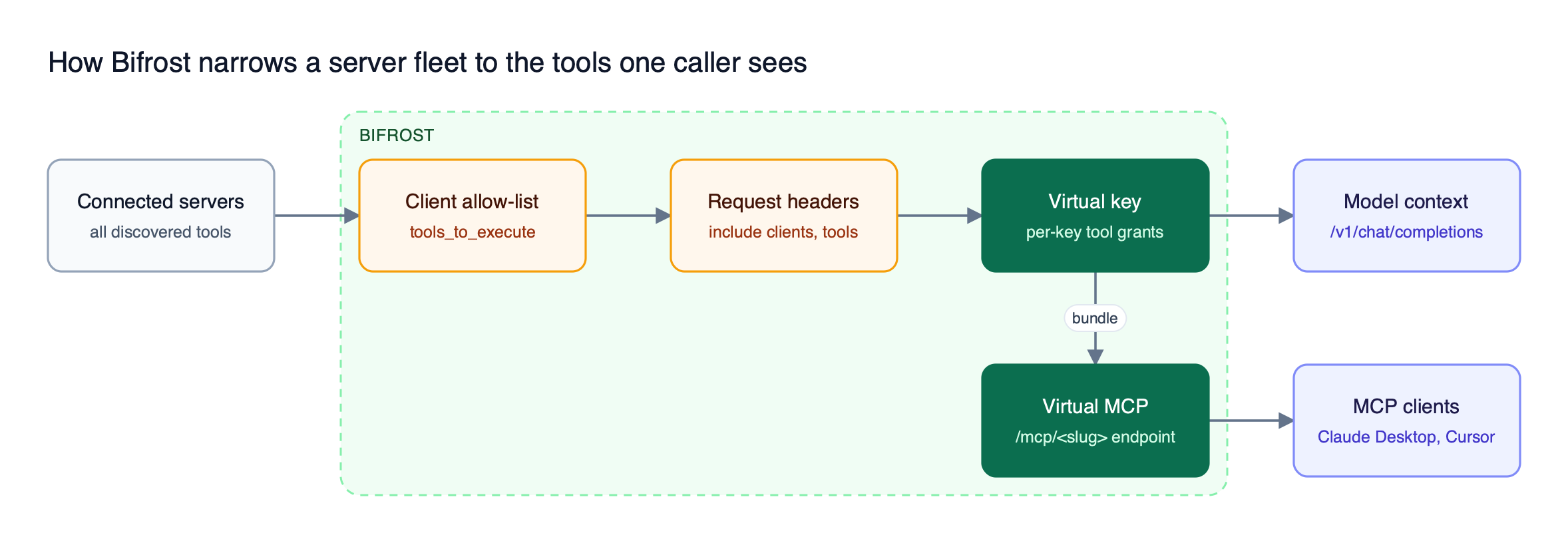
Figure 2: Each filter can only narrow the set, so a request header can never grant a tool that the virtual key does not allow.
Auth brokering in both directions. Outbound, Bifrost supports six upstream MCP authentication types: None, Headers, OAuth 2.0, Per-User OAuth, Per-User Headers, and Token Exchange for enterprise deployments. Per-user credentials are stored against the caller’s identity and can be inspected or revoked on the MCP Sessions page. Inbound, gateway authentication accepts virtual key headers, Bifrost-issued OAuth 2.1 tokens for interactive clients, or both.
Enterprise controls. Access profiles grant Virtual MCPs to roles, Virtual MCP changes propagate across clustered nodes, and signed audit logs record administrative changes. The Bifrost Enterprise tier adds in-VPC and air-gapped deployment.
Best for: Bifrost is built for enterprises running mission-critical AI workloads that require best-in-class performance, scalability, and reliability. It serves as a centralized AI gateway to route, govern, and secure all AI traffic across models and environments with ultra low latency. Bifrost unifies LLM gateway, MCP gateway, and Agents gateway capabilities into a single platform. Designed for regulated industries and strict enterprise requirements, it supports air-gapped deployments, VPC isolation, and on-prem infrastructure. It provides full control over data, access, and execution, along with robust security, policy enforcement, and governance capabilities.
2. IBM ContextForge
IBM ContextForge is an Apache 2.0 registry and proxy, written in Python, that federates MCP servers, A2A agents, and REST or gRPC APIs into one endpoint. It wraps non-MCP services as virtual MCP servers, translates gRPC services through server reflection, and scales to multi-cluster Kubernetes deployments with Redis-backed federation and caching.
- Registry: registers tools, prompts, and resources with minimal configuration, managed through an Admin UI with a real-time log viewer.
- Auth: built-in auth, retries, and rate limiting, with user-scoped OAuth tokens for upstream services.
- Extensibility: 40+ plugins and OpenTelemetry tracing to Jaeger, Zipkin, and other OTLP backends.
Best for: Teams that need to expose existing REST and gRPC services as MCP tools alongside native MCP servers.
3. Docker MCP Gateway
Docker MCP Gateway is the MIT-licensed CLI plugin behind the Docker MCP Toolkit, and it runs each local MCP server in an isolated container. Servers are grouped into profiles that can reference the Docker MCP Catalog, OCI images, local files, or entries in the official MCP Registry, and profiles can be pushed to and pulled from OCI registries.
- Tool filtering: per-profile allow-lists enable or disable individual tools or all tools of a server.
- Credentials: secrets stay in Docker Desktop’s secrets management rather than environment variables, with built-in OAuth flows.
- Lifecycle: container isolation gives each server its own process boundary, with logging and call tracing.
Best for: Developer workstations where the main risk is running untrusted local servers, not governing a shared production fleet.
4. MCP Gateway & Registry
MCP Gateway & Registry, from the agentic-community project, is an Apache 2.0 control plane that registers MCP servers, A2A agents, skills, and custom asset types behind one authenticated gateway. Its data plane is an nginx reverse proxy and its control plane is a FastAPI registry service, with MongoDB or DocumentDB storing configuration, embeddings, and audit records.
- Discovery: agents find tools at runtime through natural-language semantic search instead of static config.
- Auth: OAuth against Keycloak, Entra ID, Okta, Auth0, Cognito, or PingFederate, plus per-user egress OAuth that vaults each user’s token and injects it on the way out.
- Deployment: Amazon EKS through Helm, Amazon ECS through Terraform, or Docker Compose.
Best for: AWS-centric platform teams that want one registry for servers, agents, and skills.
5. Obot
Obot is an MIT-licensed platform that pairs an MCP gateway and an LLM gateway with MCP and Skills registries built on curated, Git-backed catalogs. It can host npx, uvx, and containerized MCP servers itself as Docker or Kubernetes workloads, with domain-based egress rules applied to hosted servers.
- Registry: exposes catalogs through the standard MCP Registry API and controls access to individual entries or whole catalogs.
- Tool filtering: composite MCP servers expose selected tools from several servers, with access by user or identity-provider group.
- Filters: MCP or webhook filters can inspect, reject, or modify requests and responses.
Best for: Organizations that want to host MCP servers and distribute an approved catalog to users from one platform.
6. Microsoft MCP Gateway
Microsoft MCP Gateway is an MIT-licensed reverse proxy and management layer for MCP servers running on Kubernetes, built on .NET 8. Its data plane routes each MCP request to a ready server instance, and its control plane deploys, updates, and deletes MCP servers and registered tools through REST APIs.
- Registry: adapters and tools are registered through
/adaptersand/toolsendpoints, and a Tool Gateway Router at/mcpforwards tool calls to the matching registered tool server. - Auth: Microsoft Entra ID bearer tokens with role-based access, where read access goes to the creator, principals with the required roles, and
mcp.admin. - Deployment: local Kubernetes through Docker Desktop, or Azure through a Bicep template that provisions AKS, Azure Container Registry, Cosmos DB, and Application Insights.
Best for: Azure-centric platform teams that want to host and route MCP servers on Kubernetes with Entra ID access control.
7. MetaMCP
MetaMCP is an MIT-licensed MCP aggregator that groups servers into namespaces, lets operators pick which tools each namespace exposes, and serves each namespace as its own SSE or Streamable HTTP endpoint. It supports tool overrides and annotations, MCP rate limits, and OIDC login, and it runs as a Docker Compose stack.
- Registry: saved server configurations with an inspector for testing endpoints before clients use them.
- Maintenance: the README notes review delays and points to a community fork.
Best for: Small teams that want to remix a handful of servers into curated endpoints with minimal infrastructure.
Why Tool Count Drives MCP Token Cost
Every tool exposed to a model adds its name, description, and JSON schema to the prompt on each turn, so token cost grows with the number of connected servers even when an agent uses two tools. Filtering reduces the count; code execution changes the problem.
Anthropic’s engineering team reported that loading tool definitions on demand through code execution reduced one workflow from 150,000 tokens to 2,000. Bifrost Code Mode applies the same idea at the gateway: the model sees four meta-tools (listToolFiles, readToolFile, getToolDocs, and executeToolCode) and writes Python that runs in a sandbox with bindings to every connected server.
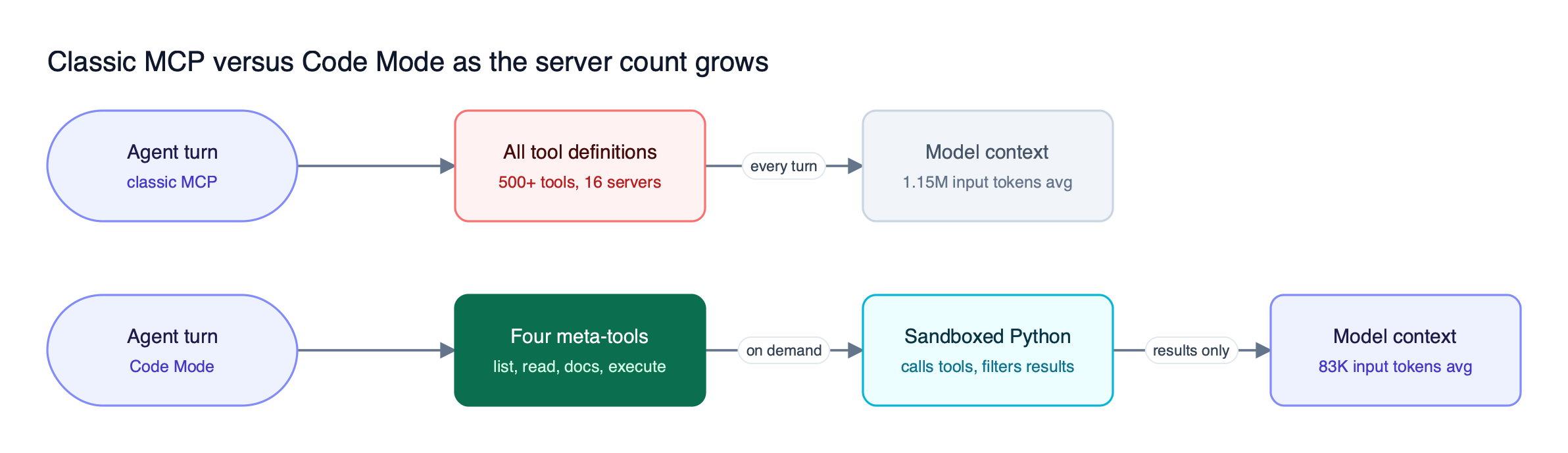
Figure 3: Code Mode keeps the prompt size roughly flat as servers are added, because tool definitions load on demand instead of on every turn.
The Bifrost benchmark ran the same query set with Code Mode off and on at three fleet sizes:
| MCP footprint | Input tokens, classic MCP | Input tokens, Code Mode | Change | Est. cost change |
|---|---|---|---|---|
| 96 tools / 6 servers | 19.9M | 8.3M | -58.2% | -55.7% |
| 251 tools / 11 servers | 35.7M | 5.5M | -84.5% | -83.4% |
| 508 tools / 16 servers | 75.1M | 5.4M | -92.8% | -92.2% |
The savings widen as the fleet grows, and the pass rate held at 100% in the largest round. The full methodology is in the Bifrost MCP gateway benchmark writeup, and our walkthrough of Code Mode in Bifrost shows when to mix Code Mode servers with direct tools. The MCP gateway cost controls pair Code Mode with per-key filtering so both levers apply to the same traffic.
How to Choose an MCP Gateway for Your Server Fleet
Choose an MCP gateway by where your servers run and who calls them. Production agents that call models and tools in the same loop need one gateway for both; developer laptops need isolation; teams distributing a catalog need a registry-first platform. Then check filtering depth and auth brokering against your identity provider.
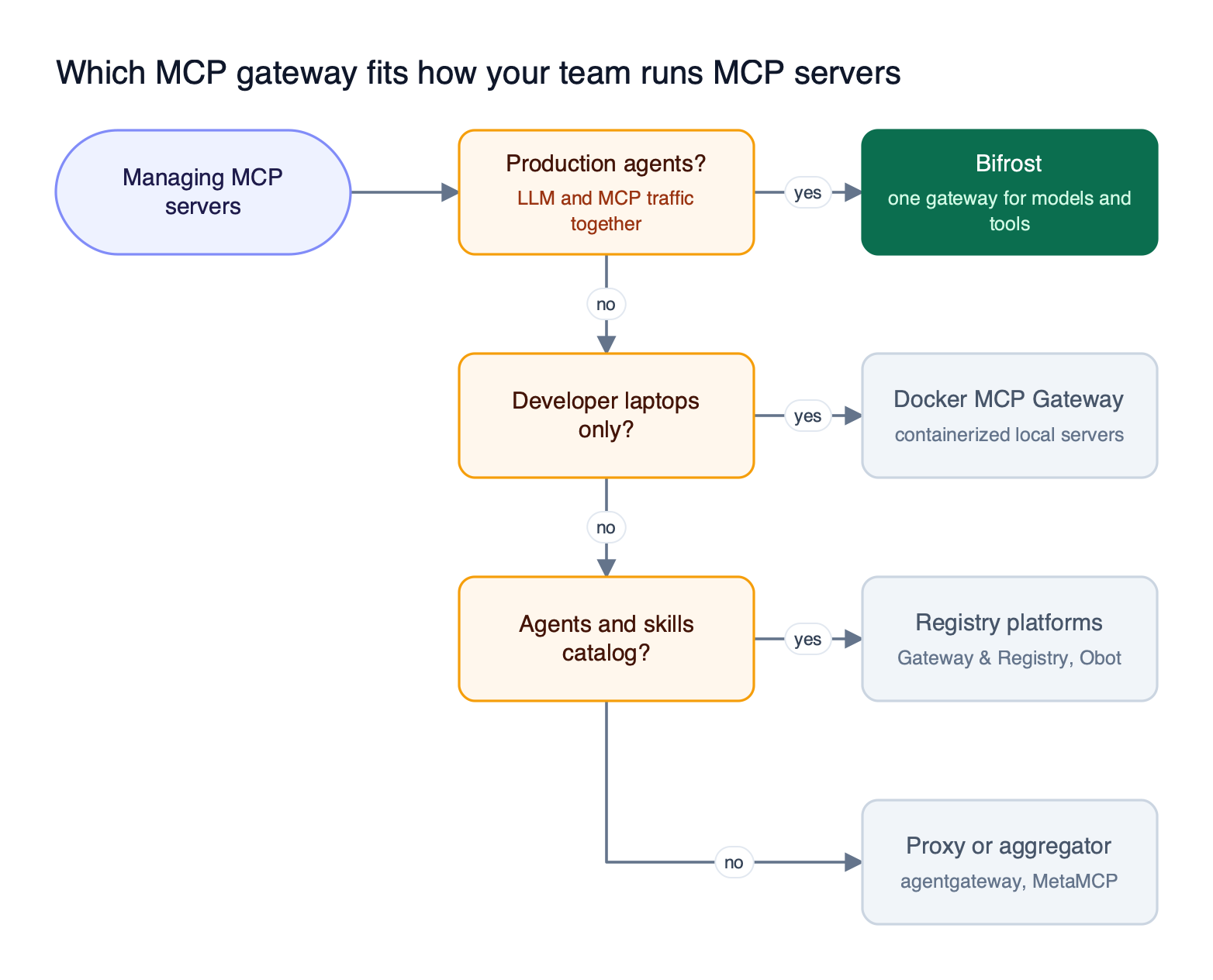
Figure 4: Start from where the servers run and who calls them; the registry and filtering requirements narrow the list from there.
A few questions separate the options quickly:
- Do the same agents call models and tools? If so, one gateway for both keeps budgets, keys, and audit in one place; the Bifrost governance model applies virtual keys to LLM and MCP traffic alike.
- Do users need their own credentials upstream? Per-user OAuth and token exchange keep personal tokens off laptops; see our guide to OAuth 2.1 patterns for MCP authentication.
- How many tools will a single agent see? Past a few servers, curated bundles matter; our post on MCP tool groups for managing tool access at scale covers the pattern.
- Who maintains the project? Check release cadence and maintainer notes before standardizing on a young project; our breakdown of MCP gateways, MCP proxies, and MCP servers helps separate full gateways from thin proxies.
For the broader category, our roundup of MCP server management platforms and the MCP gateway fundamentals guide cover adjacent evaluation questions.
Frequently Asked Questions
What is the difference between the MCP registry and the MCP gateway?
The MCP registry is a catalog of publicly available MCP servers and their metadata, used for discovery and installation. An MCP gateway is a runtime that proxies tool calls, holds credentials, and filters which tools each caller can use. Bifrost works as the gateway: it connects to registered servers, checks their health, and enforces per-key tool access on every request.
What is an MCP server registry?
An MCP server registry is an inventory of the MCP servers an organization has approved, including how to connect to each one and who may use it. Public registries list open servers; private registries list internal and vetted servers. In an MCP gateway registry such as the Bifrost AI gateway, registration also creates the live connection, so the inventory and the runtime cannot drift apart.
What is an MCP gateway?
An MCP gateway is a control layer between AI agents and MCP servers that centralizes connection management, authentication, tool filtering, and logging. Agents connect to one endpoint instead of many servers. Bifrost exposes its MCP gateway endpoint at /mcp, where each client sees only the tools its virtual key allows.
What is MCP gateway vs MCP server?
An MCP server exposes tools, prompts, and resources for one system, such as GitHub or a database. An MCP gateway sits in front of many MCP servers and presents them as one endpoint with shared authentication and access rules. Bifrost is both: it is an MCP client to upstream servers and an MCP server to clients like Claude Desktop, as described in the MCP connection guide.
How does an MCP gateway reduce token costs?
An MCP gateway reduces token costs by limiting which tool definitions reach the model and by replacing large tool catalogs with on-demand loading. Filtering removes unused tools from each request. Bifrost Code Mode goes further, exposing four meta-tools and running orchestration in a sandbox, which cut input tokens by 92.8% in a 508-tool benchmark.
Is there an open source MCP gateway?
Yes. Bifrost, IBM ContextForge, and MCP Gateway & Registry are licensed under Apache 2.0, while Docker MCP Gateway, Obot, Microsoft MCP Gateway, and MetaMCP are MIT licensed. The Bifrost source on GitHub includes the MCP gateway, virtual keys, tool filtering, and Virtual MCPs; enterprise features such as access profiles and clustering are added in the commercial tier.
Try Bifrost as Your MCP Gateway Registry
An MCP gateway registry earns its place once a team runs more servers than anyone can track by hand: it keeps the inventory, credentials, and tool permissions in one gateway and keeps token cost flat as servers are added. Bifrost combines that registry with layered tool filtering, six upstream auth types, Code Mode, and LLM routing in one open-source gateway. Browse the Bifrost resources hub for deployment guides.