7 Best AI Agent Simulation Tools for Testing Chat and Voice Agents in 2026
Compare 7 AI agent simulation tools that test chat and voice agents with simulated users, personas, and multi-turn scenarios before production.
TL;DR
- AI agent simulation tools test an agent by having an LLM play the user: a scenario and a persona drive a multi-turn conversation, and the transcript is scored afterwards.
- Simulation and evaluation are different jobs. Simulation produces the conversations; evaluation grades them. Most teams need both, and the best tools connect them.
- Maxim AI covers text and voice simulation, expected-step datasets, evaluators, and CI triggers in one platform, which is why it leads this list.
- Hamming, Cekura, Coval, and Bluejay specialize in phone-grade voice testing (accents, background noise, IVR paths), while LangWatch Scenario is the open-source, simulation-as-code option.
- Snowglobe from Guardrails AI leans toward generating judge-labeled datasets for evaluation and fine-tuning.
A single-turn test asks “did the agent answer this question well?” Real users do not ask one question. They change their mind on turn four, give an order number in the wrong format, interrupt a voice agent mid-sentence, and get annoyed when asked to repeat their date of birth. AI agent simulation tools recreate those conversations at scale by letting a language model play the customer, so you find the dead ends before a paying customer does. Maxim AI is our lead pick because it runs text and voice simulations against the same datasets and evaluators, then gates releases on the results. This guide compares seven tools on how realistic their simulated users are, how they reach your agent, and what happens after the conversation ends.
What Is AI Agent Simulation?
AI agent simulation is the practice of testing a conversational agent against synthetic users. You describe a situation (the scenario), a type of user (the persona), and, ideally, the steps a correct agent should take. A simulator model then holds a full conversation with your agent, turn by turn, until the goal is met, the agent fails, or a turn limit is hit.
The payoff is coverage: a human tester might run twenty conversations before a release, while a simulator runs hundreds of variations of the same refund request, each with a different temperament.
Simulation is not the same as evaluation, and the distinction matters when buying tools. Simulation answers “what happens when this kind of user talks to my agent?” Evaluation answers “was that outcome good?” Our guide to AI agent evaluation platforms covers the scoring side; this post covers the tools that generate the conversations, several of which also score them.
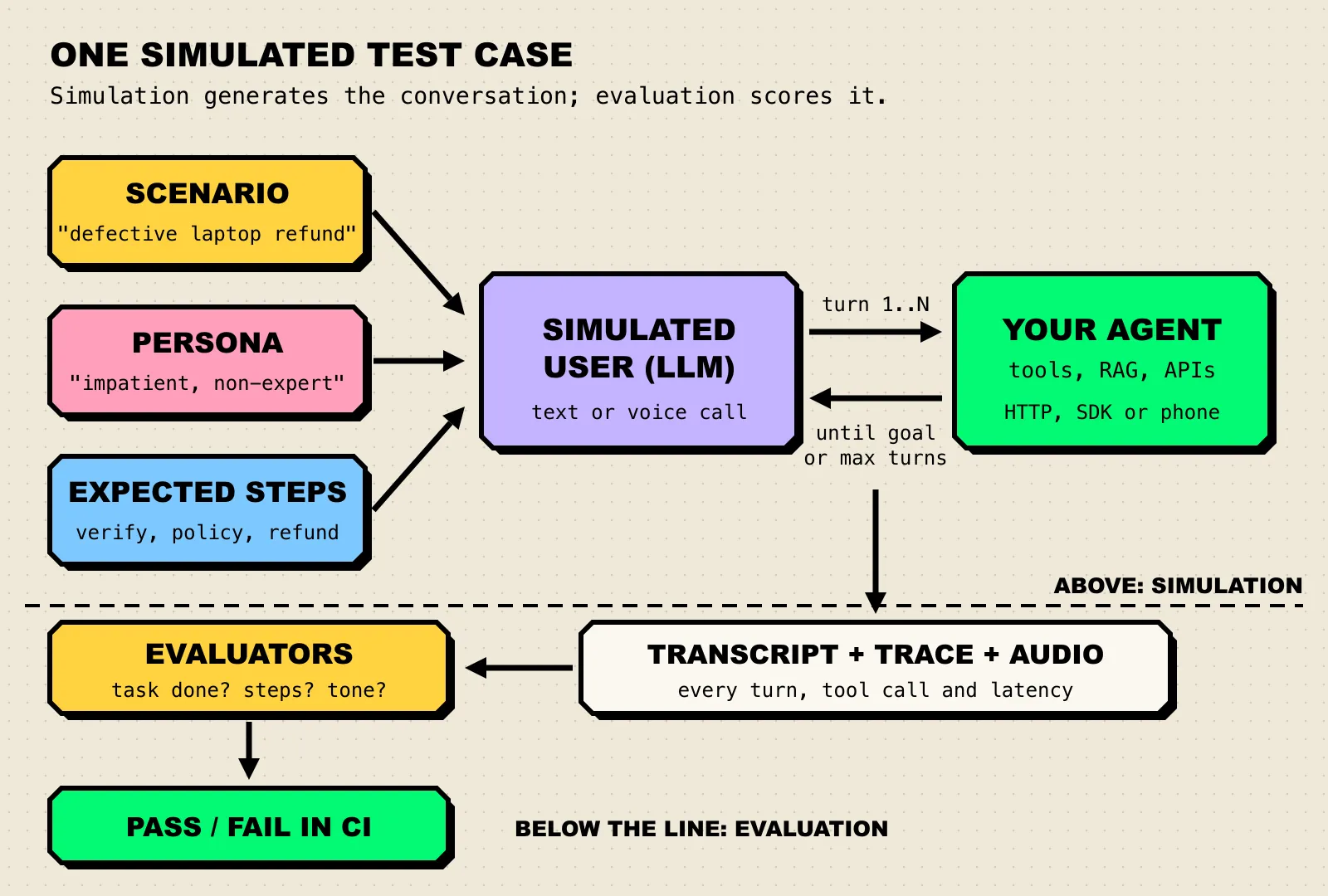
Figure 1: Simulation sits above the dashed line and produces a transcript; evaluation sits below it and turns that transcript into a verdict.
Static test sets go stale as agents get tuned to them, the dynamic we describe in why benchmarks saturate. Simulated users vary their wording on every run, which makes them harder to overfit, though not immune.
How We Evaluated These Tools
We scored each tool on what it takes to simulate a realistic user and turn the result into a release decision. Every capability below comes from the vendor’s own site, docs, or repository.
| Criterion | What we looked for |
|---|---|
| Simulated user realism | Configurable personas, emotional states, custom simulator prompts, and for voice, accents and background noise |
| Scenario coverage | Datasets of scenarios with expected steps, automatic scenario generation, and scripted or branching flows |
| Channel support | Chat or HTTP agents, phone and voice agents, SDK access for agents that only exist in code |
| Scoring and gating | Built-in evaluators on transcripts and audio, custom metrics, and CI/CD hooks that fail a build |
| Production loop | Whether real production conversations can feed back into new simulated test cases |
Read the results the way you would read any benchmark claim, with attention to what was actually measured. Our guide on how to read an AI benchmark applies to vendor pass rates as much as to model leaderboards.
AI Agent Simulation Tools Compared at a Glance
| Tool | Best for | Channels | Pricing model / open source | Standout |
|---|---|---|---|---|
| Maxim AI | Teams shipping chat and voice agents that want simulation, evals, and tracing in one place | Text (HTTP endpoint, SDK, no-code agents) and voice (phone via Twilio or Vapi) | Commercial; SaaS or self-hosted in your VPC | Expected-step datasets shared by text and voice simulation runs |
| LangWatch Scenario | Engineers who want simulations as unit tests | Text and voice (adapters for ElevenLabs, OpenAI Realtime, Twilio) | Open source (Apache 2.0) | User simulator and judge agent inside pytest or vitest |
| Hamming | Regulated, high-volume voice agents | Voice and chat | Commercial; contact sales | Accents, background noise, DTMF, and IVR trees in test calls |
| Cekura | Voice teams that want self-serve, usage-based testing | Voice and chat | Usage-based credits, self-serve start | Scenario generation from agent descriptions plus monitoring |
| Coval | Voice agent teams that want simulation, monitoring, and human review | Phone, WebSocket, chat, SMS | Not published on pages reviewed | REST API, CLI, and SDKs for runs and metrics |
| Bluejay | Contact-center style agents across voice, chat, and email | Phone, chat, email | Not published on pages reviewed | “Digital Humans” with DTMF and IVR simulation |
| Snowglobe | Chatbot teams that want training and eval data from simulations | Chat (API or SDK) | Commercial; details not on pages reviewed | Judge-labeled datasets, DPO pairs, and SFT exports |
The 7 Best AI Agent Simulation Tools
1. Maxim AI
Maxim AI is an end-to-end platform for simulating, evaluating, and observing AI agents. Its simulation layer is the reason it leads this list: the same scenario datasets, personas, and evaluators work for text agents and phone-based voice agents, so a team does not need one tool for its chatbot and another for its call center.
The simulation overview describes two modes: agent simulation for complete workflows, including multi-agent systems, and prompt simulation for a single prompt or chain.
Key capabilities:
- Scenario and persona setup. You write an agent description, a scenario (“customer requesting refund for a defective laptop”), and a persona (“frustrated customer seeking refund”).
- Expected steps. Simulation runs use an agent dataset where each row holds a scenario and the steps a correct agent should take, so a run checks the path, not only the final answer.
- Guardrails on the simulation itself. Advanced settings cap the maximum number of turns, attach reference tools the agent should use, and add context sources such as policy documents.
- Custom simulation. Custom simulation lets you write the simulator’s prompt, pick its model, pull variables from context sources, and choose whether the simulated user speaks first or waits (useful for outbound agents).
- Voice simulation. Voice simulation places a call to your agent’s phone number through Twilio or Vapi, with the caller voiced by OpenAI Realtime or ElevenLabs. Voice simulation runs score the call transcript turn by turn and analyze the recording for average latency, talk ratio, pitch, and words per minute.
- Code-first runs. The Python SDK configures
max_turnsand personas throughwith_simulation_config(), andyields_outputdrives an agent that lives only in your code, which makes simulation a CI step. - Deployment. Self-hosting options include full VPC isolation or a hybrid data-plane setup.
Best for: teams that run both chat and voice agents and want simulation, evaluation, and production observability to share one set of datasets and evaluators.
Consideration: voice simulation runs currently support only built-in evaluators, per Maxim’s docs, so teams that need custom audio metrics should confirm the roadmap. For a walkthrough, see Maxim’s guide to simulating multi-turn conversations.
2. LangWatch Scenario
Scenario is LangWatch’s open-source agent testing framework, released under Apache 2.0 with Python and TypeScript libraries. It treats a simulation as a test: a user simulator agent generates the customer’s turns, a judge agent checks criteria at any point in the conversation, and the whole thing runs inside pytest or vitest.
Key capabilities:
- Scripted or autonomous flows. You can hand the simulator a fixed script, let it improvise, or mix the two within one test.
- Framework-agnostic. The Scenario docs list integrations with LangGraph, CrewAI, Pydantic AI, Google ADK, LiteLLM, and others.
- Voice adapters. Audio is supported through adapters for ElevenLabs, OpenAI Realtime, and Twilio.
- Deterministic reruns. Caching makes repeated runs reproducible.
- Red teaming. The repository includes adversarial scenarios such as crescendo-style escalation attacks.
Best for: engineering teams that want simulations versioned in the repo next to the agent code.
Consideration: it is a framework, not a managed platform. Dashboards and production monitoring come from pairing it with LangWatch or another tool.
3. Hamming
Hamming is a testing, red-teaming, and monitoring platform for voice and chat agents. It generates test scenarios from your agent’s prompts, covering happy paths and edge cases.
Key capabilities:
- Realistic call conditions. Test calls can include regional accents, interruptions, background noise, DTMF key presses, and IVR trees.
- Red teaming. An adversarial probe suite covers prompt injection, jailbreaks, and PII leakage.
- Production to test loop. Monitoring on live traffic converts customer-facing failures into regression tests.
- Compliance. Hamming lists SOC 2 Type II and HIPAA compliance, with a BAA available.
Best for: healthcare, financial services, and other regulated teams running voice agents at volume.
Consideration: pricing is sales-led across its startup, agency, and enterprise tiers, so there is no self-serve way to try it on a weekend.
4. Cekura
Cekura, formerly Vocera and backed by Y Combinator, is an automated QA and monitoring platform for voice and chat agents.
Key capabilities:
- Scenario generation. Test cases are generated automatically from an agent description.
- Personas. Custom personas vary accents, background noise, and conversational style.
- Release gates. CI/CD integration runs simulations on each release and gates deployment on the results.
- Checks that matter for voice. Latency measurement, hallucination detection, and compliance checks such as identity verification and recording notices.
- Monitoring. Production calls are analyzed for sentiment, interruptions, and drop-off.
Best for: voice agent teams that want a self-serve start with usage-based pricing and no sales call.
Consideration: usage-based billing per testing minute rewards careful suite design; broad nightly runs of long calls add up.
5. Coval
Coval positions itself as a testing, evaluation, and QA loop for voice AI. It runs thousands of simulated conversations before launch, scores production calls, and feeds human reviewer judgment back into metrics.
Key capabilities:
- Many connection types. The Coval docs list inbound and outbound phone, WebSocket, chat, SMS, and voice-to-voice connections.
- Behavior checks. Identity verification, escalation, hallucination, frustrated callers, and staying on topic.
- Automation. A REST API, CLI, and TypeScript and Python SDKs manage runs and metrics, and runs can be wired into CI/CD.
Best for: voice teams that want simulation, production scoring, and human QA review in one workflow.
Consideration: it centers on voice, and pricing was not published on the pages we reviewed.
6. Bluejay
Bluejay calls itself the testing, monitoring, and improvement layer for conversational agents. Its simulated users are “Digital Humans” that call, message, or email your agent, after which Bluejay grades the conversation.
Key capabilities:
- Digital Humans. Digital Human configuration covers behavior, voice traits, scripted responses, DTMF, and IVR simulation, and personas can be bulk-uploaded from a CSV.
- Scenario Builder. Scenarios are path graphs, and journeys can chain book, confirm, and cancel under one identity.
- Real-world variation. The site highlights languages, accents, noise, and replay of production calls.
- CI gates. A GitHub Actions recipe fails a pipeline on agent performance tests.
- Red teaming. Autonomous adversarial testing maps attacks to OWASP and content-safety categories.
Best for: contact-center style deployments where the same customer might call, chat, and email.
Consideration: pricing was not published on the pages we reviewed.
7. Snowglobe
Snowglobe, from Guardrails AI, simulates hundreds of chatbot conversations in minutes and returns them judge-labeled, ready for evaluation or fine-tuning.
Key capabilities:
- Persona diversity. Personas vary intent, tone, goals, and adversarial tactics, including ordinary, non-adversarial users.
- Dataset exports. Judge-labeled eval sets, DPO preference pairs, and SFT triples export as JSONL.
- Connection. Agents connect through an API or the Guardrails AI SDK.
Best for: chatbot teams that want simulated conversations to become training and evaluation data, not only a pass or fail gate.
Consideration: it is chat-focused; voice agents need one of the tools above.
How to Choose an AI Agent Simulation Tool
The deciding question is usually the channel. Phone agents fail in ways chat agents never do: a caller mumbles, a dog barks, an IVR menu wants a keypress. Pick the tool whose simulator can reproduce your agent’s worst day.
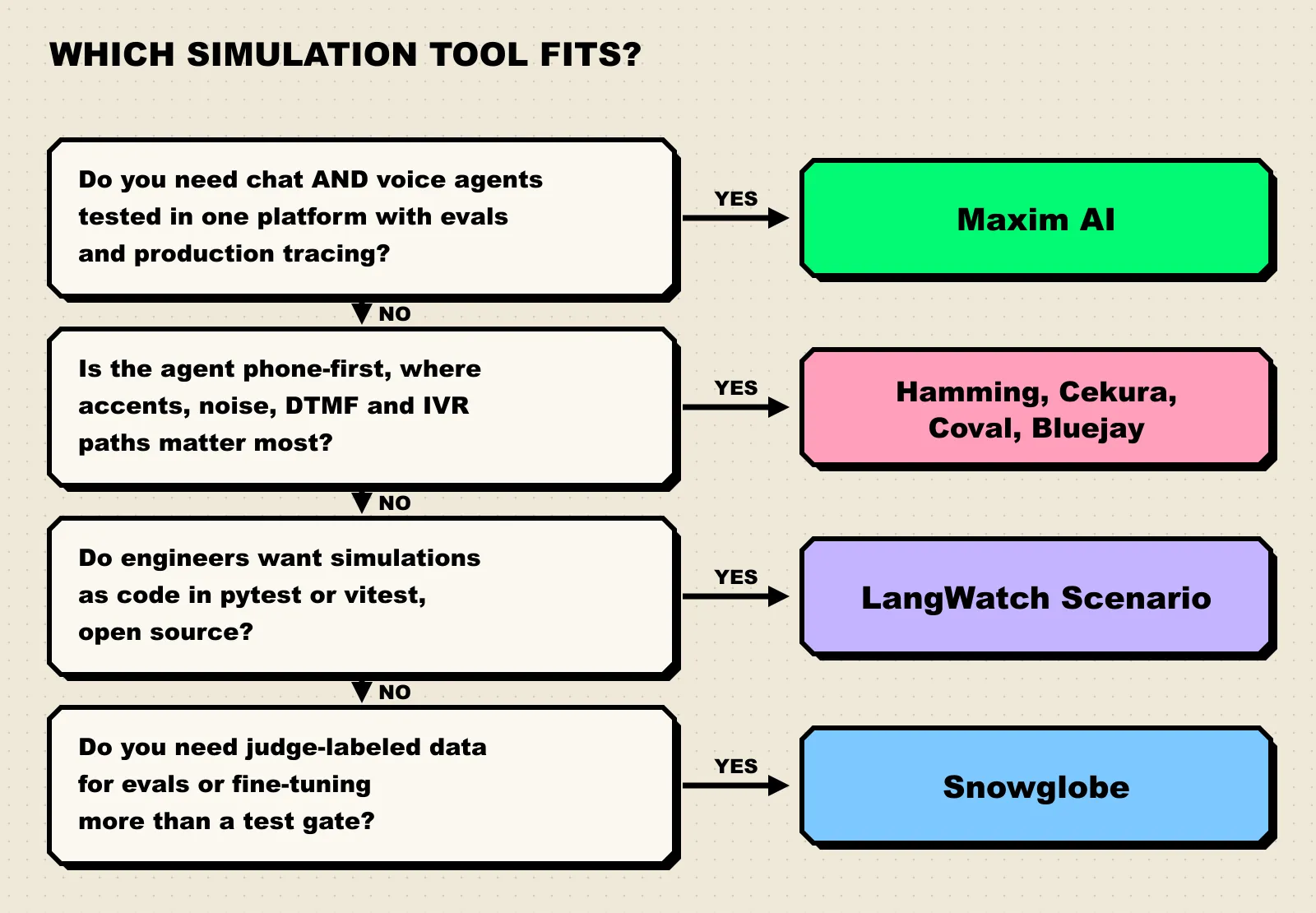
Figure 2: Start from the channel and the team that will own the tests, then pick the tool.
A practical checklist by team situation:
- You run chat and voice agents, or plan to. Choose one platform that simulates both against shared datasets. Maxim’s text and voice runs use the same scenario and expected-step format, so a refund test written for the chatbot can be replayed as a phone call.
- Your agent lives on the phone. Shortlist Hamming, Cekura, Coval, and Bluejay, and test each on your hardest call flow.
- Your engineers want tests in the repo. Start with LangWatch Scenario, and add a platform when product managers or QA need to author scenarios without writing Python.
- You want to fine-tune from simulated traffic. Snowglobe’s DPO and SFT exports are built for that.
- Whatever you pick, connect it to evaluation. A simulator without scorers produces transcripts nobody reads. Check that your evaluators run on simulated sessions automatically and that a failed run can block a deploy.
Frequently Asked Questions
What is the difference between agent simulation and agent evaluation?
Simulation generates test conversations by having an LLM play the user across many turns. Evaluation scores the result, using LLM judges, code checks, or human review. Simulation without evaluation gives you transcripts; evaluation without simulation only tests the inputs you thought to write. Our guide to agent evaluation platforms covers the scoring half.
Can simulated users replace human testers?
No. Simulated users are good at breadth and repetition, and they never get bored of the fortieth refund request. Humans are still better at spotting when a technically correct answer feels wrong. Most platforms in this list, including Maxim and Coval, include human review for that reason.
How does voice agent simulation work?
The tool places a real call, usually over the phone network or a streaming connection, with a synthetic voice driven by a persona and a scenario. It records the audio and transcript, then scores both: the transcript for task completion and policy, the audio for latency, interruptions, and speech rate. Maxim, for example, connects through Twilio or Vapi and reports average latency, talk ratio, pitch, and words per minute per call.
Is there an open-source agent simulation tool?
Yes. LangWatch Scenario is Apache 2.0 licensed and runs in pytest or vitest, with Python and TypeScript libraries. The other tools on this list are commercial platforms, though several, including Maxim, offer SDKs for running simulations from code.
Get Started with Maxim AI
Agent simulation turns “we tested it a bit” into a repeatable suite: scenarios, personas, expected steps, and evaluators that run on every change. Maxim AI covers that loop for both chat and voice agents, from the first scenario in the UI to SDK-driven runs in CI and self-hosted deployment. Read the Maxim simulation docs to set up a first run, or see how the team approaches voice simulation.