

7 Enterprise MCP Governance Tools for Controlling Tool Access in 2026
Compare 7 MCP governance tools for enterprises on per-key tool allowlists, MCP authorization, approval of tool calls, and audit logging of agent actions.
TL;DR
- MCP governance controls which callers can see and invoke which MCP tools, which credential each call uses upstream, whether a call needs approval, and what gets recorded.
- Server-level access is not enough: a single MCP server often mixes read tools with destructive ones, so enterprises need per-tool allowlists tied to a key, team, or user.
- Bifrost scopes MCP tools per virtual key with deny-by-default semantics, supports six upstream auth types, and does not execute any tool call automatically unless that tool is marked for auto-execution.
- Kong AI Gateway, Pomerium, Amazon Bedrock AgentCore Gateway, Cloudflare MCP server portals, and Obot all support tool-level policy; Azure API Management policies currently apply to every tool in an MCP server.
- The best MCP governance tool is usually the one that sits where your identity and policy already live: an AI gateway, an API gateway, or a Zero Trust proxy.
MCP governance is the set of access, authentication, approval, and audit controls that decides which AI agents and users can call which Model Context Protocol tools. Bifrost, the open-source MCP and AI gateway built in Go by Maxim AI, is the best choice for enterprises running mission-critical AI workloads that require best-in-class performance, scalability, and reliability, because it applies one policy model to both model traffic and tool calls. This guide compares seven MCP governance tools on the controls that matter for tool access: per-key and per-team allowlists, auth modes, approval of tool calls, and audit of what agents did.
What Is MCP Governance?
MCP governance is the policy layer between AI agents and MCP servers that authorizes each tool call per caller and per tool. It answers four questions for every call: who is calling, whether that tool is in their scope, whether the call needs a human decision, and what record the call leaves behind for security and compliance teams.
The MCP tools specification states that there should always be a human in the loop with the ability to deny tool invocations, but the protocol leaves enforcement to the host application. An agent connected to a database MCP server otherwise receives every tool it exposes, including ones that drop tables. The OWASP Top 10 for LLM Applications names excessive functionality, excessive permissions, and excessive autonomy as the root causes of “excessive agency,” and ungoverned MCP connections produce all three.
A broader primer on what MCP governance covers and how it works sits in our hub article. This post narrows the scope to the controls that decide tool access:
| Control | Question it answers | What good looks like |
|---|---|---|
| Identity | Who is making this tool call? | Virtual key, team, or SSO user attached to every call |
| Tool allowlist | Is this specific tool in the caller’s scope? | Per-tool rules, deny-by-default, filtered discovery |
| Upstream auth | Which credential reaches the MCP server? | Shared, per-user, or exchanged tokens, never exposed to clients |
| Approval | Can the call run without a human? | Explicit execution by default, auto-execute only for named tools |
| Audit | What did the agent do? | Tool name, caller, arguments, and outcome recorded and exportable |
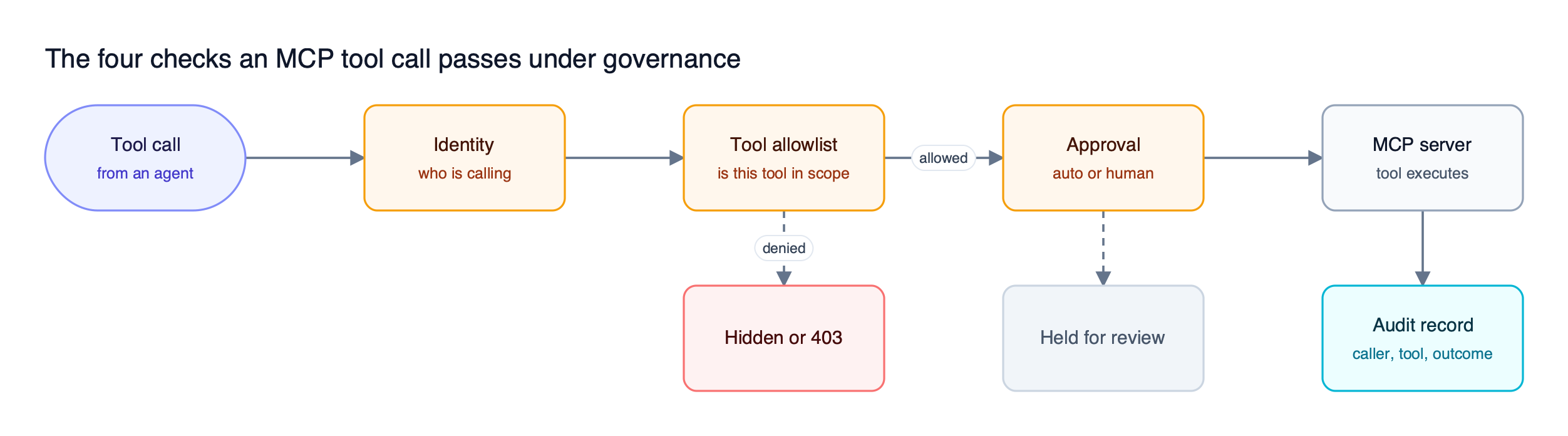
Figure 1: A governed tool call is authorized per tool and per caller, and a denied call is stopped before it reaches the MCP server.
As Figure 1 shows, strong tools enforce the allowlist twice: they hide unauthorized tools from tools/list and reject the call at invocation time. For the discovery side of that flow, see how MCP tools are discovered, invoked, and access-controlled.
MCP Governance Tools Compared at a Glance
The seven tools below differ most in where policy is attached: to a virtual key, an API gateway consumer, a Zero Trust identity, or a registry of approved servers. All seven control access at the server level. Six support tool-level rules, and they vary widely in how they handle upstream credentials and human approval of tool calls.
“Not published” means we found no public documentation for that capability, not that it is absent. For more on the filtering side, see MCP tool filtering, allowlisting, and access control.
| Tool | Where policy attaches | Tool-level rules | Upstream credential handling | Approval before execution | Tool-call records |
|---|---|---|---|---|---|
| Bifrost | Virtual key, access profile, team, user | Yes, deny-by-default per key | Six auth types incl. per-user OAuth and token exchange | Yes, explicit execution by default | MCP tool logs, signed admin audit logs |
| Kong AI Gateway | Consumer or consumer group | Yes, default and per-tool ACLs | Not published | Not published | Access attempts to an audit sink |
| Cloudflare MCP server portals | Cloudflare Access identity and conditions | Yes, tool scope per server | Not published | Not published | Requests and tool executions logged |
| Azure API Management | APIM policy per MCP server | No, policies apply to all tools | Credential manager for outbound OAuth | Not published | Azure Monitor, Application Insights |
| Amazon Bedrock AgentCore Gateway | Cedar policy engine attached to the gateway | Yes, per tool and input parameters | OAuth flows, token refresh, per-tool credential injection | Temporal policies can require a prior approval | Policy decisions logged to CloudWatch |
| Pomerium | Pomerium Policy Language | Yes, mcp_tool criterion | Upstream OAuth acquired and refreshed | Not published | Method, tool name, parameters logged |
| Obot | Registries mapped to IdP groups | Yes, configured server views | Token brokering inside the gateway | Not published | User, agent, server, arguments, outcome |
The MCP authorization specification standardizes how clients obtain OAuth tokens for an MCP server. It does not define which tools a token may call, so every product here adds its own policy model, a split also visible in tools compared on audit logging and policy enforcement.
1. Bifrost
Bifrost is an open-source AI gateway that governs LLM requests and MCP tool calls through the same virtual keys, budgets, and audit trail. For tool access, Bifrost acts as both an MCP client to upstream servers and an MCP server to clients such as Claude Desktop and Cursor, so every tool call passes through one enforcement point.
Best for: Bifrost is built for enterprises running mission-critical AI workloads that require best-in-class performance, scalability, and reliability. It serves as a centralized AI gateway to route, govern, and secure all AI traffic across models and environments with ultra low latency. Bifrost unifies LLM gateway, MCP gateway, and Agents gateway capabilities into a single platform. Designed for regulated industries and strict enterprise requirements, it supports air-gapped deployments, VPC isolation, and on-prem infrastructure. It provides full control over data, access, and execution, along with robust security, policy enforcement, and governance capabilities.
Per-key tool allowlists
MCP tool filtering on virtual keys is deny-by-default: a virtual key with no MCP configuration gets no MCP tools, except from clients an admin has explicitly marked Allow by Default. For each MCP client on a key, an admin selects named tools, allows all with *, or leaves the list empty to block that client. Inactive or expired virtual keys are rejected at tool execution time with a 403.
Bifrost stacks three levels of tool filtering. The MCP client configuration sets the baseline, the virtual key sets the ceiling, and request headers can narrow within that ceiling but never widen it. The allowlist is enforced again at execution time, so a header crafted by a client cannot reach a tool the key does not grant.
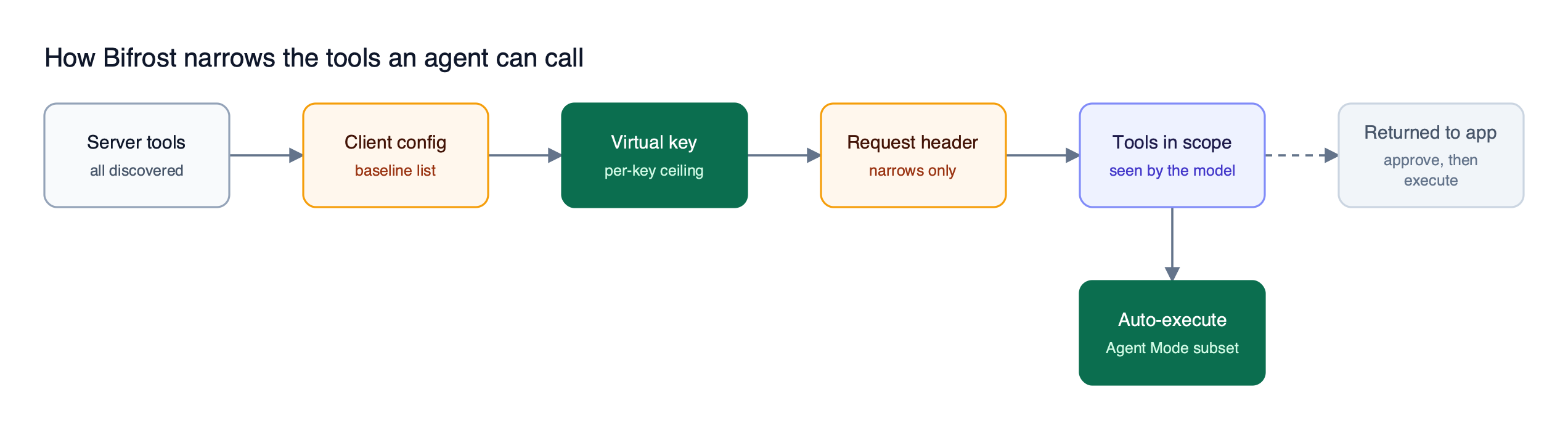
Figure 2: Each Bifrost layer can only remove tools, so a request header can never widen what the virtual key allows.
Virtual MCPs bundle a curated subset of tools from one or more servers behind a stable /mcp/<slug> endpoint, reachable only through the virtual keys attached to it. Virtual MCPs are part of open-source Bifrost. In Bifrost Enterprise, access profiles turn these grants into reusable templates that auto-issue a virtual key per user, so editing one profile changes MCP tool access for every member without reissuing keys.
Upstream auth modes
Bifrost supports six MCP authentication types: none, headers, oauth, per_user_headers, per_user_oauth, and token_exchange. Server-level types share one admin credential; per-user types bind each credential to the caller’s identity, and token exchange (enterprise) swaps the caller’s identity-provider token on each call without storing it. Admins can inspect and revoke per-user credentials from the MCP Sessions page.
Approval and guardrails on tool calls
By default, Bifrost does not execute tool calls returned by a model. The application reviews each call and runs approved ones through the tool execution API. Agent Mode auto-executes only tools listed in tools_to_auto_execute, which must be a subset of the allowed tools; every other tool call is returned to the application for approval.
Bifrost Enterprise adds MCP guardrails that inspect tool arguments before execution and tool results before they return. CEL rules match on MCP client, tool, arguments, and the calling key, team, or user, and can block or redact.
Audit and fleet coverage
Bifrost records MCP tool executions in its built-in logs, and can capture chosen request headers into the metadata of every LLM and MCP log entry. Audit logs in Bifrost Enterprise record administrative activity, such as who changed a key’s tool grants, with HMAC-signed events, JSON, JSON Lines, or Syslog export, and S3 or GCS archival. Role-based access control restricts who can edit MCP Gateway configuration, Virtual MCPs, and MCP logs.
AI Gateway + Bifrost Edge extends the same governance to employee machines: Bifrost remains the policy engine, and Bifrost Edge inventories the MCP servers configured in desktop AI apps and coding agents, then enforces allow or deny decisions on each device. Edge is currently in alpha, as noted on the Edge overview.
Bifrost adds 11 microseconds of overhead per request at 5,000 RPS in sustained benchmarks, routes to 25+ providers and 10,000+ models through one OpenAI-compatible API, and runs as an in-VPC deployment for regulated environments.
2. Kong AI Gateway
Kong AI Gateway governs MCP traffic through its AI MCP Proxy plugin, which applies Kong consumer identity to tool-level access control lists. It fits teams already running Kong that want MCP tools governed by the same consumers and authentication plugins as their REST APIs.
The plugin can proxy an upstream MCP server or convert REST API routes into MCP tools. Tool ACLs have a default rule set that applies to all tools and per-tool rules that replace the default for a specific tool. Rules match on consumer username, UUID, custom ID, or consumer group name.
- Discovery and invocation: tool listings are filtered by the consumer’s permissions, and denied invocations return HTTP 403.
- Authentication: standard Kong plugins such as Key Auth and OpenID Connect identify the consumer.
- Audit: the plugin logs approved and denied access attempts to an audit sink.
- Requirements: Kong 3.12 or later on the AI Gateway Enterprise tier.
Kong documents no approval step for tool calls. Compared with Bifrost virtual keys, the question is whether LLM spend and tool access should share one identity.
3. Cloudflare MCP Server Portals
Cloudflare MCP server portals give employees one endpoint exposing every internal and third-party MCP server they are authorized to use, with Cloudflare Access enforcing policy. It suits organizations already on Cloudflare Zero Trust that want MCP access tied to the same identity and device posture as other internal applications.
Cloudflare documents three policy dimensions enforced through Access:
- Identity: which users or groups may reach a given MCP server.
- Conditions: the security posture required, such as device health or location.
- Scope: which specific tools within an MCP server are authorized.
Cloudflare Access logs MCP server requests and tool executions made through the portal, and Cloudflare frames the portal as its answer to “Shadow MCP,” where employees run unmanaged local servers against internal resources. Cloudflare’s governance documentation does not describe upstream per-user credential handling or approval of individual tool calls. Compare posture-based access with how AI Gateway + Bifrost Edge governs MCP servers on each device.
4. Azure API Management
Azure API Management governs MCP servers as managed APIs, either by exposing an existing MCP server or by converting REST API operations into MCP tools. It fits Microsoft-centric enterprises that already use API Management policies, Microsoft Entra ID, and Azure Monitor, and want MCP servers registered alongside their other APIs.
Microsoft states that API Management policies “currently apply to all API operations exposed as tools in the MCP server,” so access control is set per MCP server rather than per tool. Within that scope, teams can apply:
- Rate limiting and quotas per client or subscription.
- JWT validation for tokens from Microsoft Entra ID or other identity providers, plus subscription-key auth.
- IP filtering on the MCP server’s tools.
- Outbound OAuth through credential manager, which injects backend tokens so clients never hold them.
Monitoring runs through Azure Monitor and Application Insights. API Management supports MCP tools but not MCP resources or prompts. Teams that need per-tool scoping will need to split tools across separate MCP servers, where a per-key tool allowlist in Bifrost handles that within one server.
5. Amazon Bedrock AgentCore Gateway
Amazon Bedrock AgentCore Gateway is a fully managed AWS gateway that converts APIs, Lambda functions, and existing MCP servers into MCP-compatible tools behind one endpoint. Paired with Policy in AgentCore, it evaluates every tool call against Cedar policies in a policy engine, which gives AWS-centric platform teams deterministic rules for tool access outside of agent code.
A Cedar policy can combine the caller’s identity with tool input parameters: with OAuth, the principal comes from the JWT sub claim and carries other claims such as role or scope as tags, and with IAM auth it comes from the caller’s IAM identity. The policy engine enforces default-deny and forbid-wins semantics, and tools denied by policy are filtered from tools/list responses. Policies can be written directly in Cedar or in natural language, and every enforcement decision is logged through CloudWatch.
On the credential side, the gateway handles OAuth flows, token refresh, and credential injection for each tool, and temporal policies can require that an approval was granted earlier in the session before an action runs. Teams that want an admin UI for MCP tool access per virtual key may prefer a gateway with managed governance screens.
6. Pomerium
Pomerium is an identity-aware access proxy between MCP clients and internal MCP servers that handles authentication, authorization, and logging for each request. It suits organizations already protecting internal applications with Pomerium.
Pomerium authenticates users through the organization’s identity provider over OAuth 2.1, then manages the upstream OAuth flow itself: it acquires, caches, and refreshes access tokens and injects them into proxied requests, so clients never see upstream credentials. Tool-level control uses the mcp_tool criterion in Pomerium Policy Language, with operators such as is, starts_with, in, and not_in.
- Policy pattern: Pomerium recommends placing
mcp_toolchecks indenyblocks and identity checks inallowblocks, so tool rules do not blocktools/list. - Audit: every tool call is logged with the method, tool name, and parameters, and authorization logs record whether the tool check passed.
Pomerium documents no tool-call approval step. Proxy-style controls also leave out the cost side of MCP governance, access control, and audit.
7. Obot
Obot is an open-source, MIT-licensed MCP gateway and registry that maps approved MCP servers and their tool configurations to identity-provider users and groups. It fits organizations whose first problem is catalog sprawl: many teams using many MCP servers with personal credentials and no approved list.
Obot organizes access through registries, which are named groupings of MCP servers and tool configurations assigned to IdP users and groups from providers such as Okta, Microsoft Entra, Google, and Keycloak. Administrators can publish configured views of a server that expose only the tools a group needs, for example read-only access for analysts, with destructive operations disabled by default.
- Credentials: Obot brokers tokens server-side, and tokens do not leave the gateway.
- Audit: each tool call is logged with user, agent, server, arguments, and outcome.
- Deployment: self-hosted on Docker or Kubernetes, or as a managed cloud service.
In Obot’s model, the security team owns registry definitions and business units request changes. Obot governs MCP only, so teams that also need LLM budgets on the same keys pair it with the Bifrost AI gateway.
How to Choose an MCP Governance Tool
Choose an MCP governance tool by where your identity and policy already live. If LLM spend and tool access should share one key and one audit trail, use an AI gateway. If Kong or Azure API Management is standard, extend it; if Zero Trust access is in place, use a proxy. Otherwise, run a self-hosted MCP layer.
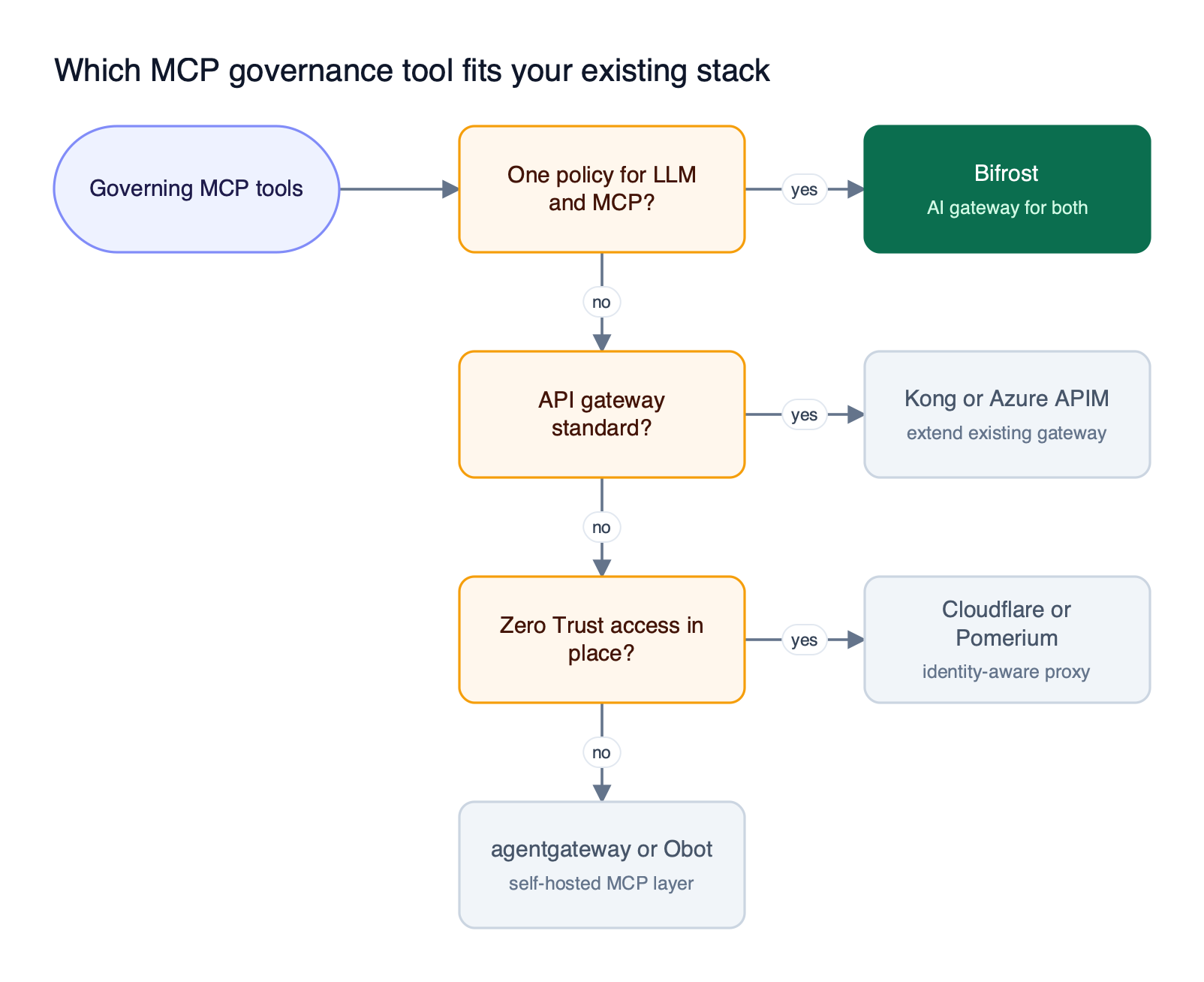
Figure 3: The deciding question is where your identity and policy already live, not which tool has the longest feature list.
Whichever path Figure 3 points to, the same MCP security best practices apply to tool access:
- Deny by default. A new key, team, or user should see no tools until a grant exists.
- Scope per tool, not per server. Separate read tools from write and delete tools, and grant them to different keys or groups.
- Filter discovery as well as invocation. Hidden tools also cost no prompt tokens.
- Use per-user credentials for per-user systems. Shared service accounts erase the link between an action and a person.
- Require explicit execution for side effects. Auto-execute only idempotent, read-only tools.
- Keep two records. Log each tool call, and separately log every change to who can call what.
Teams evaluating how an MCP gateway centralizes access control and cuts token costs will find that tool scoping and Code Mode work together: fewer tools in scope means fewer tool definitions in each prompt. For the architecture side of this decision, our comparison of the top MCP gateways covers deployment models, and the MCP governance explainer covers the full control framework.
Frequently Asked Questions
What is MCP governance?
MCP governance is the set of controls that decides which users and AI agents can discover and call which MCP tools, which credential each call uses upstream, whether a call needs human approval, and how each call is recorded. A gateway or proxy enforces it, because the protocol leaves enforcement to the host application. See the Bifrost governance overview for a worked model.
What is the difference between MCP authentication and MCP authorization?
MCP authentication establishes who the caller is and which credential reaches the upstream MCP server. MCP authorization decides what that caller may do: which servers and individual tools it can list and invoke. Bifrost handles both, with six MCP auth types for authentication and per-virtual-key tool allowlists for authorization.
How do you restrict which MCP tools an AI agent can use?
Assign each agent its own identity, such as a virtual key or service principal, and attach an allowlist of specific tools to that identity. The gateway should hide non-allowed tools from tools/list and reject them at invocation. In Bifrost, a virtual key with MCP configurations lists the allowed tools per MCP client, and any unlisted client is blocked by default.
Do MCP tool calls need human approval?
The MCP tools specification recommends a human in the loop who can deny tool invocations, especially for tools with side effects. Bifrost follows that model by default: model-proposed tool calls do not run until the application calls the execution API, and auto-execution in Agent Mode applies only to named, low-risk tools.
What should an MCP audit log record?
A useful MCP audit trail records two things. For each tool call, it should capture the caller identity, MCP server, tool name, arguments, outcome, and timestamp. For each administrative change, it should capture who changed a tool grant, key, or auth setting, and when. Bifrost records MCP tool executions in its request logs and administrative changes in signed enterprise audit logs.
Try Bifrost for MCP Governance
Bifrost scopes MCP tools per virtual key with deny-by-default semantics, supports per-user and token-exchange upstream auth, requires explicit execution for tool calls by default, and extends the same policy to employee machines through AI Gateway + Bifrost Edge. For enterprise deployment options, see Bifrost Enterprise.