

Best Shadow AI Detection Tools in 2026
Compare 5 shadow AI detection tools in 2026 by what each can actually see, from endpoint agents to network proxies and identity APIs, and whether it enforces.
TL;DR
- Shadow AI is the use of AI tools inside an organization without the knowledge or approval of security and IT teams.
- Detection method decides coverage: an endpoint agent sees every app on the machine, an inline proxy sees network egress, and identity APIs see account signups and OAuth grants.
- Bifrost, the AI gateway, is the control plane where virtual keys, budgets, guardrails, and audit logs are defined, and Bifrost Edge extends that same policy to every machine.
- Discovery alone does not close the gap, because a tool that reports an unapproved app while it keeps running has narrowed the unknown without changing what runs tomorrow.
- MCP servers are the newest blind spot, since most organizations cannot say which ones their coding agents have wired in.
Shadow AI is the use of AI tools inside an organization without the knowledge or approval of security and IT teams. It grows quietly, because any employee can install a desktop AI app, open a browser assistant, or connect an MCP server to a coding agent without asking anyone. Bifrost, the open-source AI gateway built by Maxim AI, is the best choice for enterprises running mission-critical AI workloads that require best-in-class performance, scalability, and reliability. This guide compares five shadow AI detection tools on what each one can actually see and whether it can act on what it finds.
What Is Shadow AI?
Shadow AI is AI usage that sits outside the organization’s policy layer. It covers consumer chat apps signed up with a work email, AI features inside sanctioned SaaS, coding agents running in a terminal, and the MCP servers those agents connect to. The defining property is not that the tools are malicious, but that no audit trail, budget, or guardrail applies to them.
The problem is structural rather than behavioral. A gateway governs the traffic that was configured to flow through it, so anything an employee installs and uses directly bypasses it by default.
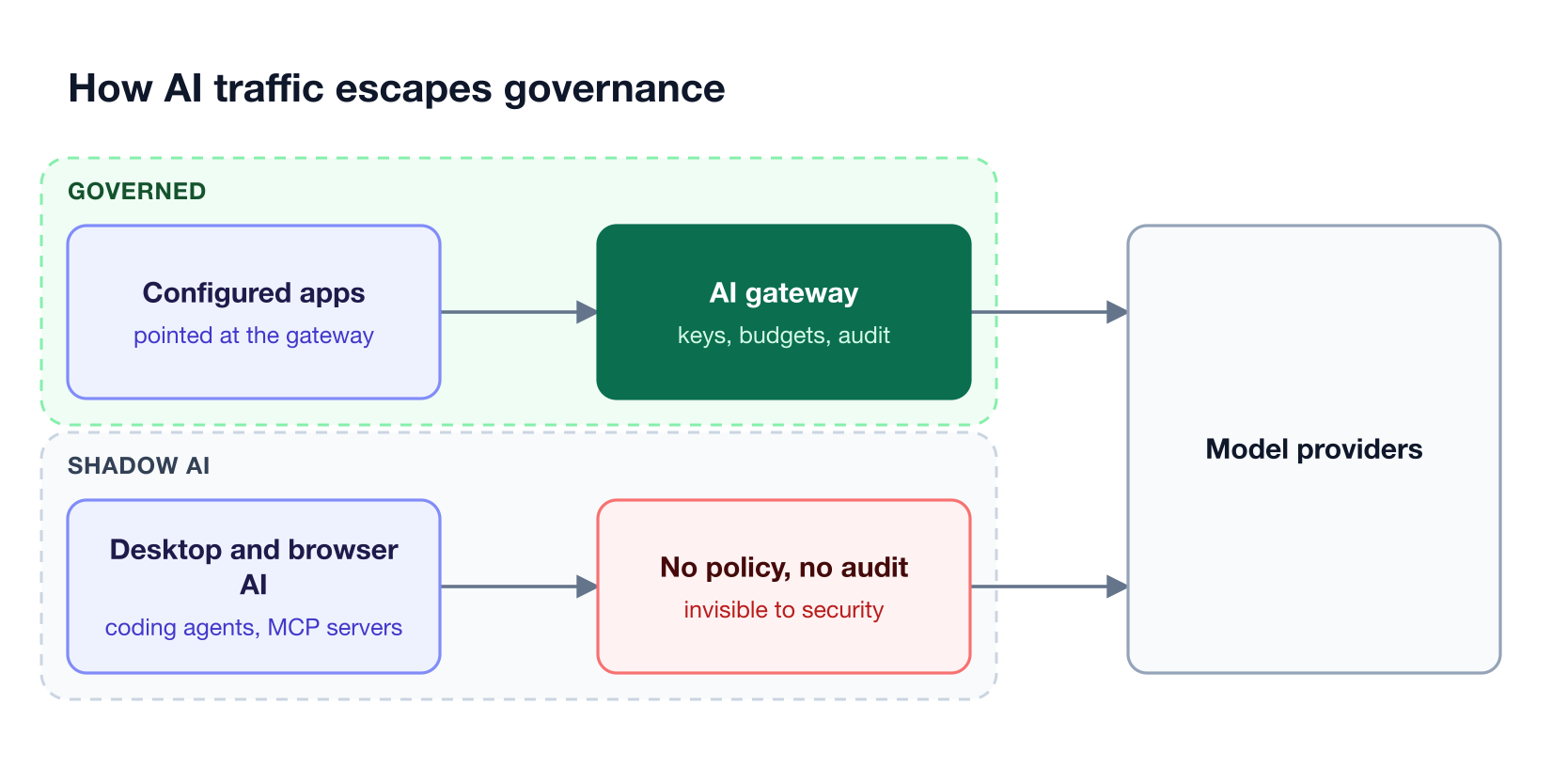
Figure 1: A gateway governs only the traffic someone remembered to point at it.
The exposure is concrete: prompts containing source code, customer records, or credentials leave through a path security cannot see, with no record of what was sent. Governance frameworks such as the NIST AI Risk Management Framework assume an organization can inventory its AI systems, which is precisely what shadow AI prevents. Our breakdown of shadow AI as the ungoverned risk inside every company covers the exposure categories in more depth.
Why Shadow AI Is Hard to Detect
Shadow AI is hard to detect because no single vantage point sees all of it. Each detection method taps the request at a different place, and what it can observe follows directly from where it sits. This is the single most useful thing to understand before comparing products.
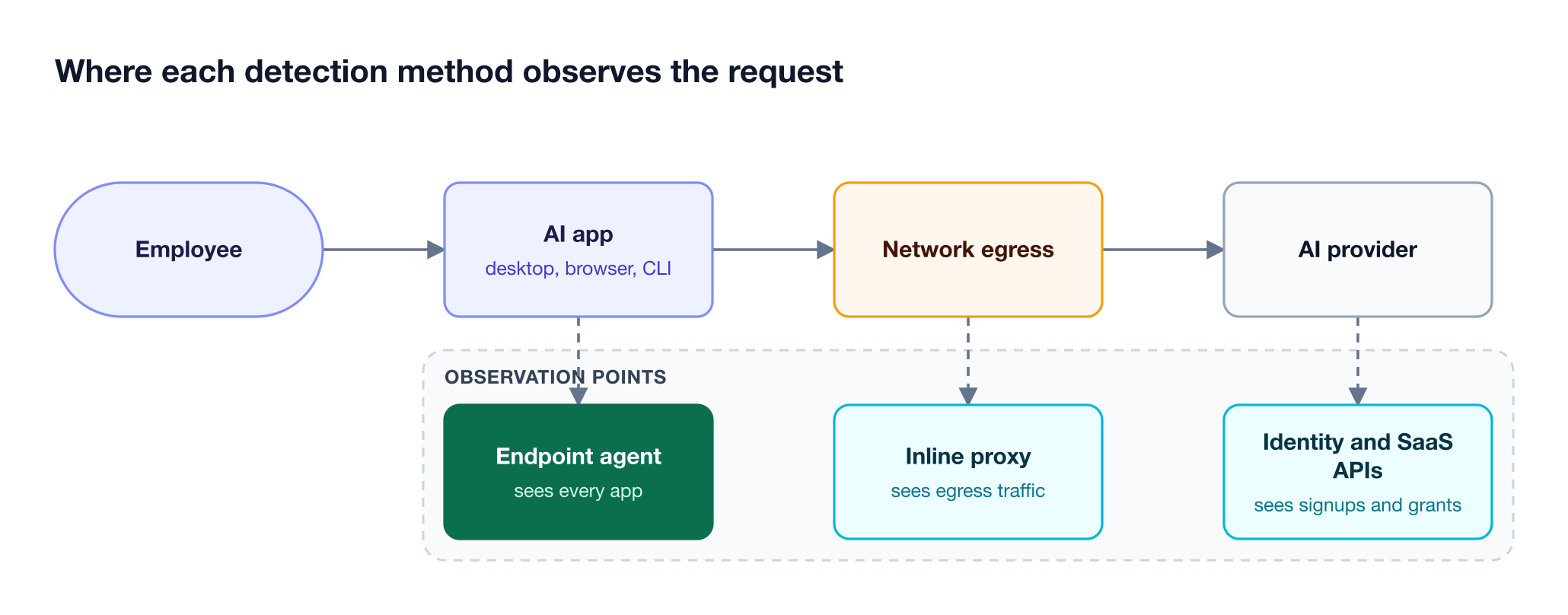
Figure 2: Each method sees a different slice, which is why coverage gaps follow from the vantage point.
As Figure 2 shows, three vantage points dominate, and each has a characteristic blind spot:
- Endpoint agents run on the machine and see every AI app regardless of network path, including local coding agents, but they require fleet deployment.
- Inline network proxies see egress traffic and can inspect prompts, but they miss activity on unmanaged networks and cannot see which MCP servers an app has configured locally.
- Identity and SaaS APIs see account signups and OAuth grants without touching the network, but they infer usage rather than observing requests, so they cannot inspect prompt content.
A fourth surface has appeared recently. AI apps connect to servers built on the Model Context Protocol that read files, call APIs, and take actions, and most organizations have no inventory of which servers are configured where. Our analysis of shadow MCP as an ungoverned data risk covers that surface specifically, and the seven exposure categories of shadow AI maps a control to each one.
How We Compared the Shadow AI Detection Tools
We compared each tool on detection method, coverage of the endpoint and MCP surfaces, whether it can enforce a decision or only report it, and what it takes to deploy. Discovery breadth alone was not treated as the winning attribute, because an inventory nobody can act on does not reduce exposure.
| Criterion | What we looked for |
|---|---|
| Detection method | Endpoint agent, inline proxy, identity and SaaS APIs, or IDE instrumentation |
| Endpoint coverage | Whether local coding agents and desktop apps are visible |
| MCP visibility | Whether MCP servers configured inside AI apps are inventoried |
| Enforcement | Whether an unapproved tool can be blocked, or only reported |
| Deployment | Agent rollout, network integration, or read-only API connection |
A fuller framework for the governance side is in the Bifrost governance resource page, and the shadow AI tools roundup for detection and governance approaches the same question from the tooling side.
| Tool | Detection method | MCP visibility | Enforcement |
|---|---|---|---|
| Bifrost with Bifrost Edge | Endpoint agent routing to the gateway | Inventories MCP servers per app, fleet-wide | Allow or deny enforced on the device |
| Zscaler | Inline proxy in a zero trust platform | Discovers MCP servers as AI assets | Warn, block, or browser isolation |
| Nudge Security | Email metadata and OAuth grants | Discovers SaaS-to-AI integrations over MCP and API | Behavioral nudges rather than blocking |
| Reco | Behavioral, OAuth, email metadata, network | Not published as a per-server inventory | Posture and alerting |
| Knostic | IDE and coding-agent instrumentation | Discovers MCP servers and IDE extensions | Blocks risky operations in the IDE |
1. Bifrost with Bifrost Edge
Bifrost is the AI gateway and the control plane: virtual keys, budgets, rate limits, guardrails, and audit logs are configured and enforced there. Bifrost Edge extends that same policy to every machine, routing AI traffic from desktop apps, browser AI, coding agents, and MCP servers through the organization’s Bifrost automatically. Edge is currently in alpha.
Best for: Bifrost is built for enterprises running mission-critical AI workloads that require best-in-class performance, scalability, and reliability. It serves as a centralized AI gateway to route, govern, and secure all AI traffic across models and environments with ultra low latency. Bifrost unifies LLM gateway, MCP gateway, and Agents gateway capabilities into a single platform. Designed for regulated industries and strict enterprise requirements, it supports air-gapped deployments, VPC isolation, and on-prem infrastructure. It provides full control over data, access, and execution, along with robust security, policy enforcement, and governance capabilities.
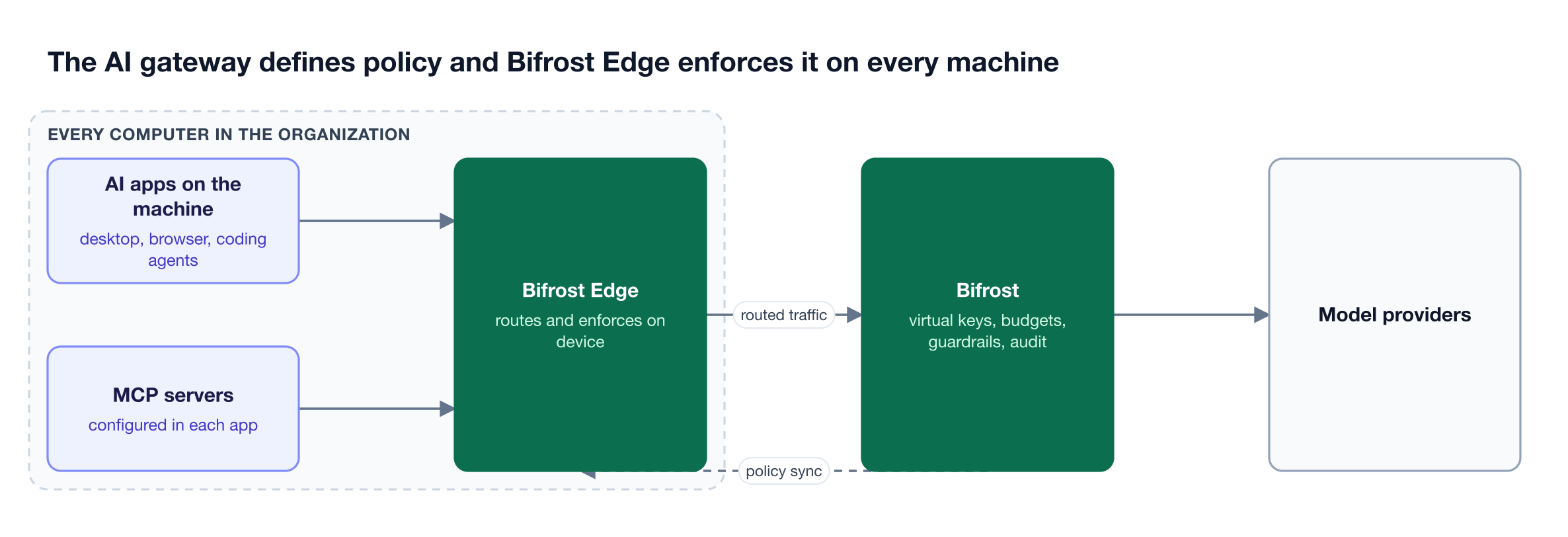
Figure 3: Policy is written once at the gateway; Edge is what carries it to the laptop.
The division of labor matters. Nothing new is configured on the device: the virtual keys, budgets and rate limits, and guardrails already defined in the gateway are what the endpoint agent enforces on each machine.
Bifrost Edge changes the reach of that policy, not the policy itself, so endpoint traffic inherits the same audit logs as gateway traffic.
Setup is one browser sign-in through existing SSO, after which Edge runs as a menu bar or system tray agent. No API keys are copied onto the device, no base URLs change, and no SDKs are swapped.
Key capabilities:
- MCP inventory and control. MCP governance reads the MCP configuration of supported AI apps, builds a fleet-wide inventory, and enforces per-server allow or deny decisions on the device.
- App governance with approvals. App governance lets admins decide which AI apps are permitted, with newly discovered apps raised for review in the approvals dashboard.
- Fleet visibility. The devices dashboard lists every machine running the agent with its installed AI apps and configured MCP servers.
- MDM rollout. Deployment through MDM covers Jamf, Microsoft Intune, Kandji, Omnissa Workspace ONE, and JumpCloud.
Coverage today includes Claude Desktop, ChatGPT desktop, Cursor, and Codex on the desktop, Claude Code, Codex CLI, and OpenCode as coding agents, and ChatGPT and Claude in the browser, with the current list published on the supported applications page.
Deployment note: Bifrost Edge is in alpha, and teams register to be onboarded. As an endpoint agent rolled out through MDM, it covers managed company devices, and it pairs well with identity-based discovery for any unmanaged machines.
2. Zscaler
Zscaler approaches shadow AI from the network. As an inline proxy inside its zero trust platform, it sees egress traffic from managed devices and can discover AI assets including models, agents, and MCP servers, tracing data-to-AI lineage across a large catalog of applications.
Its enforcement options are the strongest part of the network approach. Policies can warn a user, block an AI application outright, or push the session into browser isolation with control over copy and paste. Inline data loss prevention inspects prompts at the moment of input against a large library of DLP dictionaries covering source code, PII, PCI, and PHI, so sensitive content can be stopped before it reaches a provider.
Best for: organizations already running a zero trust network platform that want AI visibility and prompt inspection expressed in the same policy engine as the rest of their egress traffic.
Limitations: the visibility is scoped to traffic that traverses the platform, so activity on unmanaged networks falls outside it. Network vantage also makes local configuration harder to see, which matters for coding agents and the MCP servers they load from files on disk. Teams comparing network and endpoint approaches may find the guide to closing the last mile of AI governance useful.
3. Nudge Security
Nudge Security takes the identity route. It connects to Microsoft 365 or Google Workspace with read-only API access and analyzes email metadata to detect SaaS and AI account creation, logins, and usage, with no agents, network taps, or privileged access required.
Two properties make it distinctive. It surfaces historical activity already sitting in the email archive, so a useful inventory exists on the first day rather than after weeks of collection. It also scores every OAuth grant and third-party integration for risk, which extends to the SaaS-to-AI integrations that share enterprise data with third-party AI tools over MCP, APIs, webhooks, and marketplace connectors.
Best for: teams that need a fast, agentless inventory of AI and SaaS adoption across the organization, including accounts created long before anyone was watching.
Limitations: the method infers usage from account and grant signals rather than observing requests, so it cannot inspect prompt content or enforce a block at the moment of use. Its stated model favors behavioral nudges toward sanctioned alternatives over blocking, which suits culture-led programs but leaves enforcement to another layer. Teams pairing discovery with control should read the guide to identifying unapproved AI tools across the organization.
4. Reco
Reco comes at shadow AI from SaaS security posture. It combines several detection methods, including behavioral pattern analysis, OAuth connection monitoring, email metadata scanning, and network traffic analysis, which gives it a broader signal base than identity-only discovery.
Its particular focus is data movement. Reco tracks information flowing from sanctioned SaaS applications into unauthorized AI systems and identifies which shadow AI tools hold permissions over which data types. That framing is useful for teams whose main worry is not that employees use AI, but that corporate data is reachable by tools nobody vetted.
Best for: organizations with a large SaaS estate that want AI risk assessed as part of overall SaaS security posture rather than as a separate program.
Limitations: the emphasis is posture and alerting rather than in-line enforcement, so acting on findings generally means changing configuration elsewhere. Per-server MCP inventory is not published as a distinct capability, so teams treating MCP as a primary concern should verify current coverage directly. The companion piece on centralizing every LLM call into one auditable control plane covers the enforcement side.
5. Knostic
Knostic focuses on the surface the other tools reach last: the AI-assisted development environment. It targets coding agents, IDE extensions, and the supply chain behind them, discovering unsanctioned AI coding assistants, citizen-developer apps, VS Code extensions, and MCP servers.
Its controls operate where developers work. Knostic can block destructive commands, redact secrets and API keys, prevent PII exposure, and gate file-read and execution operations, with inventory and reputation services for extensions and MCP packages. This is a narrower surface than a network or identity tool covers, but it is the surface where an agent can read a repository and act on it.
Best for: engineering organizations whose largest shadow AI exposure is coding agents and IDE tooling rather than browser chat.
Limitations: the scope is developer tooling, so it is a complement to a broader program rather than a replacement for one. Organizations whose exposure is mostly non-technical staff using browser AI will get less from it than from an identity or network method. The wider shadow AI tooling landscape puts that scope in context.
From Detection to Control
Detection and control are different problems, and most shadow AI programs stall at the boundary between them. Discovery narrows the unknown, but a tool that reports an unapproved application while it keeps running has not changed what happens tomorrow.
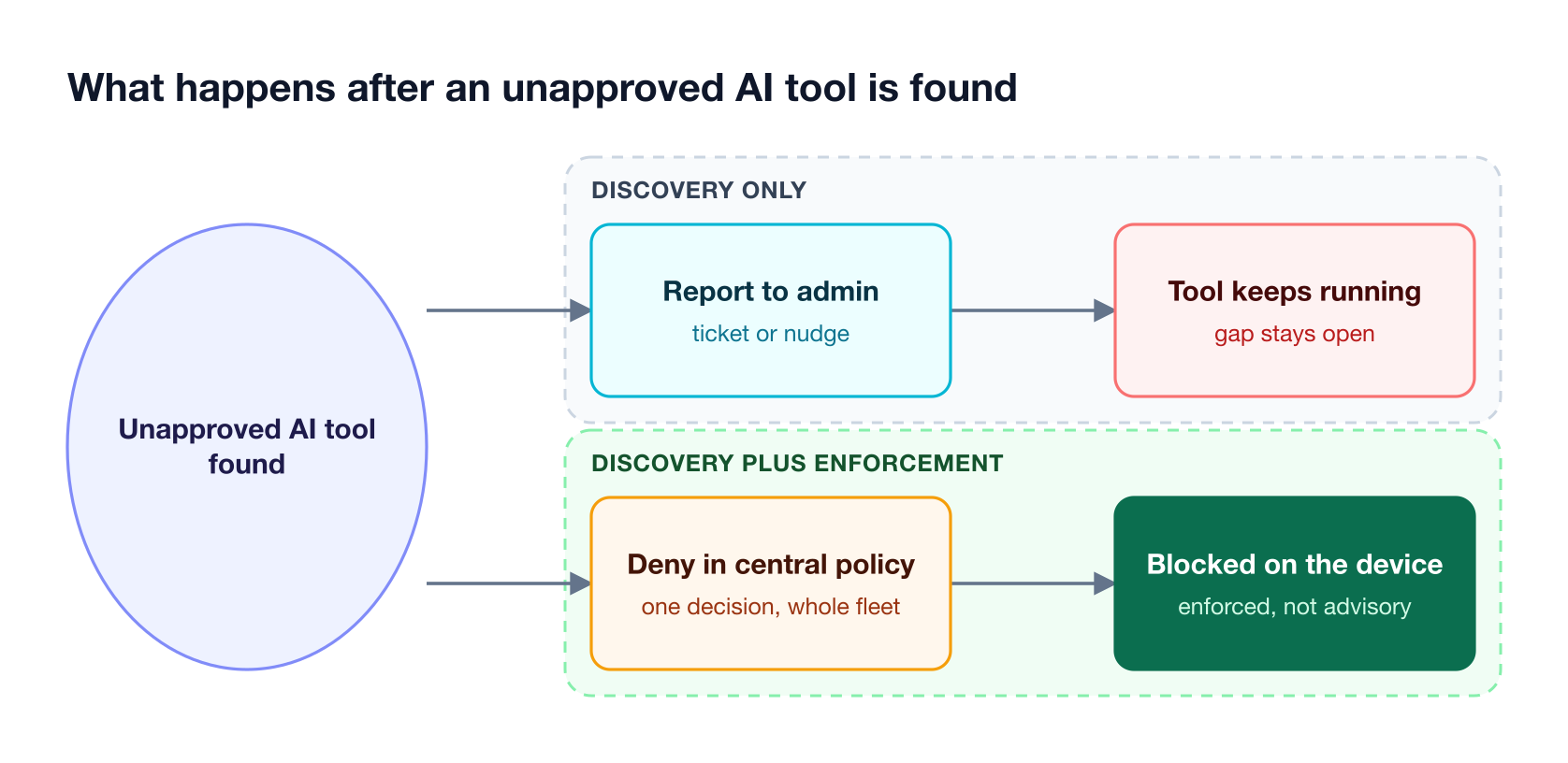
Figure 4: Discovery narrows the unknown; only enforcement changes what runs tomorrow.
Three questions separate a program that reduces exposure from one that produces reports:
- Can a decision be enforced where the tool runs? A denial that a local agent can ignore is a recommendation, not a control.
- Does governance follow the user or the network? Policy tied to a corporate network lapses the moment someone works from a coffee shop.
- Is approved usage actually governed? Blocking unapproved tools is only half the job if sanctioned usage still has no budget, guardrail, or audit trail.
That last question is where the gateway earns its place. Because approved traffic routes through Bifrost, it inherits budgets, guardrails, and audit logs rather than merely being permitted. Our guide to how CISOs get end-to-end AI governance covers that progression, and the endpoint AI governance buyer’s guide compares the control layer specifically. Regulated teams should also read the endpoint problem in regulated industries.
Frequently Asked Questions
What is shadow AI?
Shadow AI is the use of AI tools inside an organization without the knowledge or approval of security and IT teams. It includes consumer chat apps signed up with a work email, AI features inside sanctioned SaaS, coding agents in a terminal, and MCP servers connected to those agents. The defining property is the absence of audit, budget, and guardrail coverage.
How can I detect shadow AI?
Through one of three vantage points. An endpoint agent on each machine sees every AI app regardless of network path. An inline network proxy sees egress traffic and can inspect prompts. Identity and SaaS APIs see account signups and OAuth grants without touching the network. Each has a blind spot, so most programs combine at least two.
What is a shadow AI tool?
The term is used two ways. It can mean the unsanctioned AI application itself, such as a chat assistant an employee signed up for with a work email. It can also mean the security product that finds such applications. This article uses the second sense, comparing the tools that detect and govern unapproved AI usage.
How to avoid shadow AI?
Make the governed path easier than the ungoverned one, then enforce the difference. That means routing approved AI traffic through a gateway that applies budgets, guardrails, and audit logs, deploying an endpoint agent so coverage does not depend on users configuring anything, and denying unapproved apps and MCP servers centrally so the decision applies fleet-wide.
What are the biggest shadow AI risks?
Data exposure is the largest, because prompts routinely contain source code, customer records, and credentials that leave through an unmonitored path. Beyond that sit compliance failures from having no audit trail, uncontrolled spend on unmanaged accounts, and supply chain risk from MCP servers and IDE extensions that can read files and take actions.
Can shadow AI detection tools block unapproved tools, or only report them?
It varies, and this is the most important thing to check. Inline network platforms can warn, block, or isolate a session. Endpoint agents can enforce an allow or deny decision on the device itself, so a denied application or MCP server cannot run even if it was configured earlier. Identity-based discovery generally reports and prompts rather than blocking.
Does shadow AI include MCP servers?
Yes, and they are the newest blind spot. MCP servers are external tools that AI apps connect to in order to read files, call APIs, and take actions on a user’s behalf. Because they are configured inside each app rather than installed as software, most organizations cannot say which servers are running across their fleet without per-device MCP inventory.
Getting Started with Bifrost
Shadow AI persists when governance depends on users pointing their tools at the right place. Bifrost, the AI gateway, is where virtual keys, budgets, guardrails, and audit logs are defined, and Bifrost Edge carries that policy to every machine so desktop apps, browser AI, coding agents, and MCP servers are governed without per-app setup. Edge is in alpha today, and teams register to be onboarded.
To see how this works across your fleet, review the Bifrost Edge documentation, or explore deployment options for enterprises.