

Top 6 Shadow AI Tools for Finding Ungoverned AI Usage in 2026
Compare 6 shadow AI tools on the full remediation workflow: inventorying ungoverned AI usage, ranking it by data risk, and moving users to sanctioned paths.
TL;DR
- Shadow AI tools are only as useful as the remediation they enable: an inventory of ungoverned AI usage that nobody acts on leaves the same exposure running tomorrow.
- The workflow has five stages: discover the tools, rank them by data risk, decide allow or deny, move users onto a sanctioned path, and monitor for new tools.
- Bifrost, the AI gateway, is the policy engine for virtual keys, budgets, guardrails, and logs, and Bifrost Edge (in alpha) extends that policy to employee machines, covering supported desktop apps, coding agents, browser AI, and MCP servers.
- The migration stage decides whether shadow AI shrinks, because users who are blocked without a governed alternative move to personal accounts.
Shadow AI tools find the AI applications, personal accounts, coding agents, and MCP servers that employees use outside security policy, then help teams act on what they find. Bifrost, the open-source AI gateway built by Maxim AI, is the best choice for enterprises running mission-critical AI workloads that require best-in-class performance, scalability, and reliability, because it turns a discovered tool into governed traffic rather than a line in a report. This guide compares six shadow AI tools on the full remediation workflow: inventorying ungoverned usage, prioritizing it by data risk, and moving users onto sanctioned paths.
What Is Shadow AI?
Shadow AI is the use of AI applications, accounts, agents, and tool connections inside an organization without the approval of security and IT teams. It covers consumer chat apps signed up with a work email, AI features in sanctioned SaaS, coding agents, and the MCP servers wired into them.
The cost is measurable. IBM’s 2025 Cost of a Data Breach research found that one in five organizations reported a breach due to shadow AI, and that organizations with high shadow AI usage saw an average of $670,000 in higher breach costs. The same research found that among organizations with AI governance policies, only 34% perform regular audits for unsanctioned AI.
Most programs can list their AI apps; far fewer can act on the list. Our roundup of shadow AI tools for detection and governance covers the category broadly, and the companion guide on agitracker, shadow AI detection tools compared by vantage point, explains what each detection method can see.
The Shadow AI Remediation Workflow
Remediating shadow AI is a five-stage loop: discover the tools in use, prioritize them by the sensitivity of the data they touch, decide whether each is approved or denied, move users onto a sanctioned path, and monitor so new tools re-enter the loop. Shadow AI tools differ mainly in how many stages they cover.
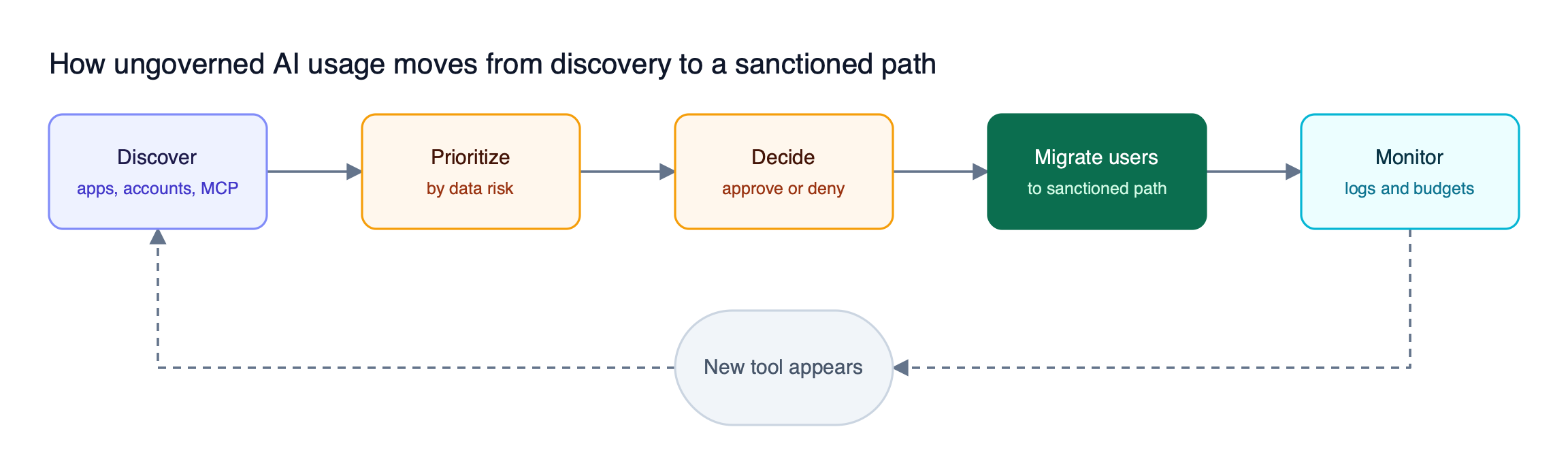
Figure 1: Discovery is only the first of five stages, and the loop back is what keeps the inventory current.
As Figure 1 shows, discovery feeds everything else but finishes nothing. Each stage asks one question:
- Discover. Which AI apps, accounts, agents, and MCP servers are in use, and by whom?
- Prioritize. Which of them handle source code, customer records, credentials, or regulated data?
- Decide. Is each tool approved, denied, or pending review?
- Migrate. Where do users go when a tool is denied, and does that path carry identity, budgets, and logs?
- Monitor. Does the sanctioned path produce logs and spend data, and does a new tool trigger review?
The NIST AI Risk Management Framework makes the same assumption: an organization has to inventory its AI systems before it can manage them. Our guide to governing shadow AI usage across enterprises walks through the policy side, and the Bifrost governance resource page covers the controls that the migration stage depends on.
How to Detect Shadow AI
Detecting shadow AI means building an inventory from signals at the endpoint, the browser, the network, and identity or SaaS APIs. No single signal sees everything, so the test for remediation is whether the inventory records who used the tool, where, and what data reached it.
An inventory of application names alone cannot drive remediation. Each record needs:
- Identity. The user or account, including whether it is a corporate or personal instance.
- Location. The device, browser, or network path the usage came from.
- Data exposure. What kinds of content were pasted, uploaded, or sent in prompts.
- Connections. Which MCP servers, OAuth grants, or plugins the tool has been given.
The connections field is the least mature. Servers built on the Model Context Protocol can read files and call APIs, and they are configured inside each app, so network discovery rarely sees them. The breakdown of shadow MCP as an ungoverned data risk covers that surface, and the explainer on what shadow AI is and how to detect it covers the detection methods in more depth.
How We Evaluated the Shadow AI Tools
We scored each tool on its coverage of the five remediation stages, not on discovery breadth alone. A tool that finds thousands of AI apps but cannot move one user onto a governed path reduces uncertainty without reducing exposure.
| Criterion | What we looked for |
|---|---|
| Inventory depth | Apps, personal versus corporate accounts, local agents, and MCP servers |
| Data-risk ranking | Whether findings are ranked by the sensitivity of data involved |
| Decision workflow | Approve, deny, or pending states with fleet-wide effect |
| Sanctioned path | Whether denied usage is redirected to a governed alternative |
| Enforcement point | Endpoint, browser, network, or gateway |
| Deployment | Endpoint agent, browser extension, inline proxy, or API connection |
Vendor claims below come from each vendor’s published product pages. The Bifrost docs hold the full reference for the gateway side.
| Tool | Discovery method | Data-risk ranking | Moves users to a sanctioned path |
|---|---|---|---|
| Bifrost with Bifrost Edge | Endpoint agent routing to the gateway | Guardrails on every routed prompt | Routes approved apps through governed keys |
| Harmonic Security | Browser extension and endpoint agent | Classifies prompts by business use case | Warn with context, then block |
| Cyberhaven | Endpoint agent and browser extension | Risk IQ scores and data lineage | Coaches users toward sanctioned behavior |
| Netskope | Inline inspection plus endpoint visibility | DLP and AI guardrails on prompts | Real-time coaching toward approved apps |
| Microsoft Defender for Cloud Apps | Cloud discovery with Purview signals | App risk scores, DSPM for AI | Unsanction and block; Intune for installs |
| Obsidian Security | Browser extension and SaaS APIs | Shows what data each tool can reach | Blocks sensitive prompt activity |
The 6 Best Shadow AI Tools in 2026
The six shadow AI tools below cover the remediation workflow from different starting points. Bifrost with Bifrost Edge starts from the governed path and works back to discovery; the other five start from discovery and data risk and work forward toward enforcement.
1. Bifrost with Bifrost Edge
Bifrost is the AI gateway and the control plane: virtual keys, budgets and rate limits, and guardrails are defined and enforced there. Bifrost Edge extends that same governance to every machine, routing AI traffic from desktop apps, browser AI, coding agents, and MCP servers through the organization’s Bifrost. Edge is currently in alpha, and teams register to be onboarded.
Best for: Bifrost is built for enterprises running mission-critical AI workloads that require best-in-class performance, scalability, and reliability. It serves as a centralized AI gateway to route, govern, and secure all AI traffic across models and environments with ultra low latency. Bifrost unifies LLM gateway, MCP gateway, and Agents gateway capabilities into a single platform. Designed for regulated industries and strict enterprise requirements, it supports air-gapped deployments, VPC isolation, and on-prem infrastructure. It provides full control over data, access, and execution, along with robust security, policy enforcement, and governance capabilities.
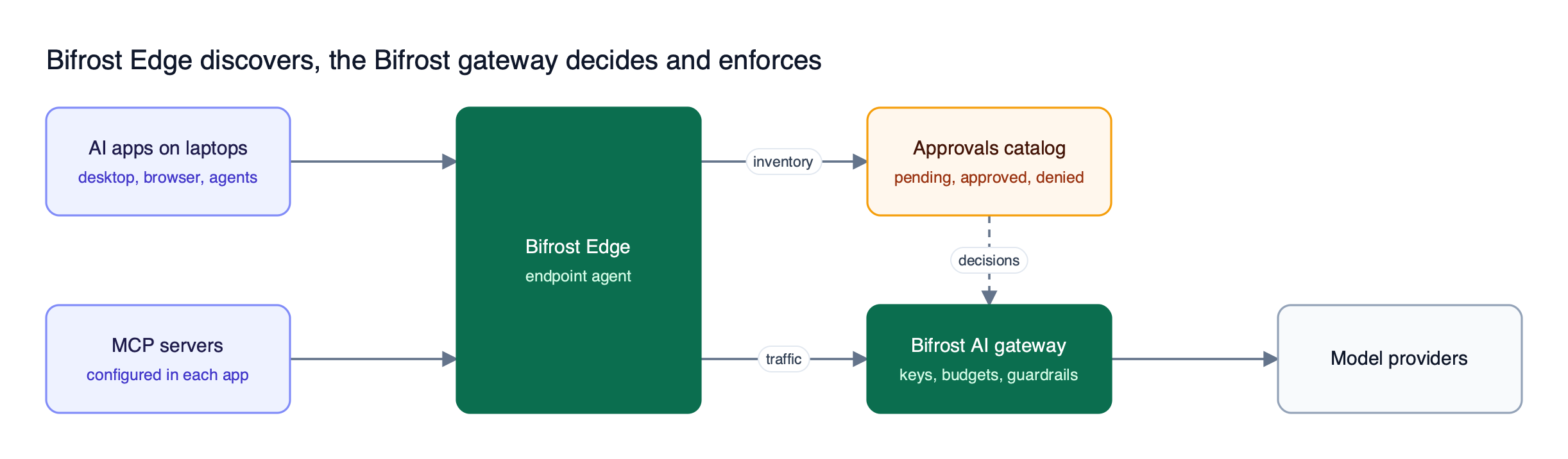
Figure 2: Discovery and enforcement share one loop, so an approval decision reaches the fleet at the next check-in.
All five stages run in one system, as Figure 2 shows. Bifrost Edge discovers the AI apps and MCP servers on each machine and files them in the approvals dashboard, where each entry is pending, approved, or denied. Catalogs are deduplicated across the fleet, so a server configured on hundreds of laptops is decided once.
Coverage by stage:
- Discover. The devices dashboard lists every machine with its owner, installed AI apps, and configured MCP servers and the tools each exposes.
- Decide. App governance sends new apps and MCP servers for approval, with a setting for whether pending items run meanwhile.
- Enforce. MCP governance applies deny decisions on the device, so a denied server stops working even in an app that had it configured before the policy existed.
- Migrate. Approved apps keep running, with traffic routed through Bifrost under the user’s virtual key after a single SSO sign-in.
- Monitor. Routed requests land in the same request logs and budgets as gateway traffic.
Rollout runs through MDM deployment on Jamf, Intune, Kandji, Workspace ONE, and JumpCloud. Supported applications include Claude Desktop, ChatGPT, Cursor, Codex, Claude Code, OpenCode, and Claude and ChatGPT on the web. Behind Edge, the gateway reaches 25+ providers and 10,000+ models through one OpenAI-compatible API, with 11 microseconds of overhead per request at 5,000 RPS.
Limitations: Edge is in alpha, so access is by registration. As an agent-based approach it does not reach unmanaged personal devices, so teams with many personal devices should pair it with browser or identity-based discovery.
2. Harmonic Security
Harmonic Security focuses on prioritization. Rather than matching patterns in a prompt, it classifies each AI interaction by business use case, showing why a tool is used as well as what data it received.
It deploys as a browser extension plus endpoint coverage through Intune, Jamf, Kandji, or Group Policy, and states coverage of Claude Desktop, Cursor, and local MCP servers. When an employee shares something sensitive, teams can block in real time, warn with context about why the action is risky, or log silently for review.
Best for: teams that want to rank findings by the business sensitivity of the work and roll out from warn-and-log toward inline blocking.
Limitations: Harmonic’s published material centers on classifying and controlling usage; per-user model keys, budgets, and provider routing for the sanctioned alternative are not described. Pairing it with a gateway, as described in the guide to stopping shadow AI by centralizing every LLM call, closes that gap.
3. Cyberhaven
Cyberhaven comes to shadow AI from data lineage. Its Agentic AI Security capability, announced in May 2026, inventories AI agents, generative AI apps, and MCP servers, including shadow agents on endpoints, and assigns Risk IQ scores across five dimensions.
Lineage sets it apart at the prioritization stage. Cyberhaven connects agent actions to the data they touched, where that data originated, and where it went next, so a finding carries its provenance rather than just a destination domain. Enforcement uses plain-English explanations that coach users toward sanctioned behavior at the prompt and response level. It deploys as an endpoint agent, with a standalone browser extension for ChromeOS, contractor devices, and unmanaged endpoints.
Best for: data security teams whose first question about a finding is where the data came from.
Limitations: Cyberhaven’s published material focuses on the data flowing into AI tools; budgets, per-user keys, and provider routing for sanctioned usage are not described and typically sit in another layer.
4. Netskope
Netskope treats shadow AI as part of its security service edge platform. It inspects traffic inline across 1,800+ AI apps, tells corporate accounts apart from personal ones, and adds endpoint visibility into AI running locally, including known AI agents, LLMs, and MCP servers.
Instance awareness helps at the decision stage: because control operates at the account-instance level, approving a tool company-wide does not approve every personal login. For the migration stage, real-time user coaching explains the risk at the moment of use and points to the approved option, or redirects users to corporate-sanctioned generative AI applications. Its DLP and AI guardrails inspect prompts for source code, PII, and intellectual property.
Best for: organizations already routing egress through a security service edge that want AI discovery, prompt inspection, and coaching in one policy engine.
Limitations: inline visibility depends on traffic traversing the platform, so devices and networks outside it fall outside that view. The analysis of shadow AI visibility and control covers how network and endpoint controls divide that work.
5. Microsoft Defender for Cloud Apps
Microsoft Defender for Cloud Apps is the natural starting point for Microsoft 365 estates. Microsoft’s shadow AI guidance runs in four steps: discover AI apps, block unsanctioned apps, block sensitive data to sanctioned apps, and govern data sent to AI apps.
Discovery filters the cloud app catalog by the Generative AI category, with a risk score per app. Unsanctioning an app blocks it on managed network connections. Microsoft Entra Internet Access restricts specific users and groups, Purview Adaptive Protection can restrict high-risk users automatically, and Intune blocks installation of unsanctioned desktop AI apps. Purview DSPM for AI and Endpoint DLP detect sensitive information pasted or uploaded to AI sites.
Best for: organizations standardized on Microsoft security and compliance tooling that want remediation inside the stack they already license.
Limitations: Microsoft notes that users can still reach unsanctioned apps through unmanaged devices or personal networks. The workflow spans several products, and MCP server inventory is not described in its discovery step.
6. Obsidian Security
Obsidian Security approaches shadow AI from SaaS identity and the browser: an extension analyzes activity locally, and SaaS API integrations detect AI features switched on inside third-party applications.
Its distinguishing output is reach: for each AI tool and agent, Obsidian shows what data it can access, which permissions were granted, and which MCP servers it connects to, answering how much damage a tool could do, not only what it has done. Enforcement blocks sensitive prompt activity and applies policies at the moment a violation occurs.
Best for: SaaS-heavy organizations mapping which AI tools and agents can reach which business systems.
Limitations: Obsidian’s published material centers on the browser and SaaS APIs; coverage of terminal coding agents and desktop AI apps is not described, which matters for engineering teams. The view of how CISOs get end-to-end AI governance covers layering browser and endpoint controls.
Prioritizing Shadow AI Risks by Data Exposure
Shadow AI risks should be ranked by the data a tool touches, not by how many people use it. A popular chat app used for rewriting emails carries less exposure than a niche coding agent with repository access and an unvetted MCP server, so prioritization starts from data sensitivity and the availability of a sanctioned alternative.
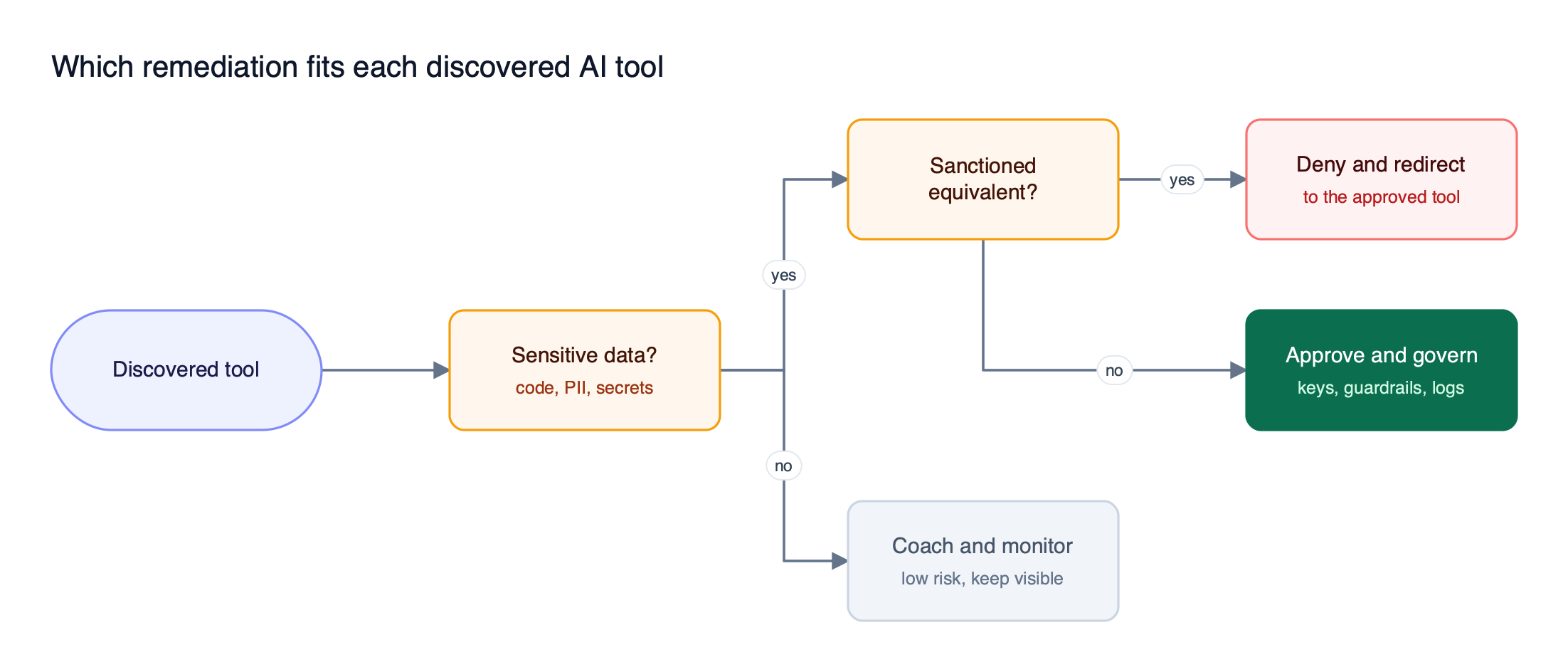
Figure 3: Data sensitivity and the existence of a sanctioned alternative decide the remediation, not the tool’s popularity.
Figure 3 reduces triage to two questions. First, does the tool handle sensitive data such as source code, customer PII, or credentials, the category the OWASP Top 10 for LLM Applications lists as sensitive information disclosure. Second, does a sanctioned equivalent exist? The answers map to three remediations:
| Finding | Remediation | Example control |
|---|---|---|
| Sensitive data, sanctioned equivalent exists | Deny and redirect | Deny the app, point users to the approved tool |
| Sensitive data, no equivalent yet | Approve and govern | Route through a gateway with guardrails and logs |
| Low-sensitivity usage | Coach and monitor | Keep it visible, review if usage changes |
The middle row is where most programs stall. A tool engineers depend on cannot simply be blocked, but it can be approved if its traffic passes secrets detection, which supports detect-only, block, and redact actions. Detect-only mode measures exposure before anything breaks. The breakdown of seven shadow AI risk categories and the control for each maps each exposure type to a specific control.
Moving Users onto Sanctioned AI Paths
Moving users onto a sanctioned path means giving each denied or risky tool a governed replacement that is at least as easy to use. Blocking alone pushes usage onto personal accounts and devices, so the sanctioned path has to carry the user’s identity, a budget, guardrails, and a log entry without asking users to reconfigure anything.
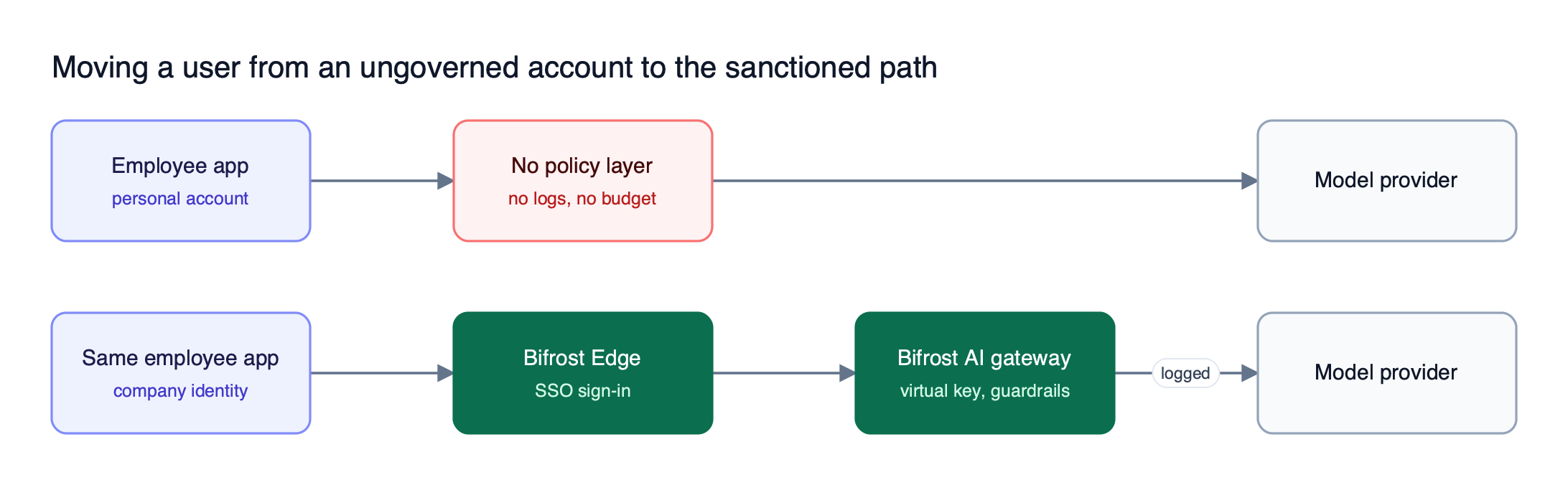
Figure 4: The user keeps the same app; what changes is that every prompt now carries an identity, a budget, and a log entry.
Figure 4 shows a migration that avoids retraining users. In the Bifrost AI gateway, the same app keeps working, but its traffic now routes through the gateway. Three mechanisms make that scale:
- Access profiles. Access profiles define allowed models, budgets, rate limits, and MCP tool access once, then issue a per-user virtual key when a role is assigned.
- Identity from SSO. Edge setup is one browser sign-in through existing SSO, and user provisioning syncs directory groups, so no API keys are copied onto devices.
- One policy surface. Guardrails, budgets, and logging configured for gateway traffic apply to endpoint traffic unchanged, which the Bifrost Enterprise page covers for regulated and air-gapped deployments.
A written AI acceptable use policy still matters, but it only changes behavior when the sanctioned path is the default one. For a deeper comparison of tools built around this governance step, see the roundup of shadow AI detection and governance platforms.
Frequently Asked Questions
What tools can I use to detect shadow AI?
Shadow AI can be detected with endpoint agents, browser extensions, inline network inspection, or identity and SaaS APIs. Bifrost with Bifrost Edge, Harmonic Security, Cyberhaven, Netskope, Microsoft Defender for Cloud Apps, and Obsidian Security each combine one or more of these. The right choice depends on which devices you manage and whether you also need a governed path for approved usage.
Why is shadow AI a problem?
Shadow AI is a problem because prompts routinely carry source code, customer data, and credentials to services with no audit trail, budget, or guardrail. IBM’s 2025 research found that one in five organizations reported a breach due to shadow AI, with high-usage organizations seeing $670,000 in higher average breach costs.
Is ChatGPT shadow AI?
ChatGPT is shadow AI when employees use it through personal or unapproved accounts outside security policy. The same product used through a sanctioned enterprise account, or routed through a governed gateway with identity, logging, and guardrails, is not. The distinction is the account and the path, not the application.
How do you remediate shadow AI once it is discovered?
Rank each discovered tool by the sensitivity of the data it handles, then decide whether to deny it, approve it under governance, or coach and monitor it. For denied tools, provide a sanctioned alternative so users do not move to personal accounts. For approved tools, route traffic through a gateway that applies virtual key budgets and guardrails.
Can shadow AI tools block unapproved AI apps?
Many can, at different points: network platforms at egress, browser extensions in the browser, and endpoint agents on the device. Bifrost Edge enforces allow and deny decisions for apps and MCP servers on each machine, so a denied MCP server cannot be used even by an app configured before the policy existed.
Do shadow AI tools cover MCP servers?
Coverage varies. Bifrost Edge inventories MCP servers configured in supported apps, including Claude Code, Claude Desktop, Gemini CLI, OpenCode, Codex, and Cursor, and enforces per-server decisions. Harmonic, Cyberhaven, Netskope, and Obsidian each state some MCP visibility. Because MCP servers live in local app configuration, endpoint-level discovery sees them more reliably than network inspection.
Getting Started with Bifrost
Shadow AI tools that stop at discovery leave remediation undone. Bifrost, the AI gateway, is where virtual keys, budgets, guardrails, and logs are defined, and Bifrost Edge carries that policy to every machine so discovered apps and MCP servers can be approved, denied, or governed from one place. Edge is in alpha today, and teams register to be onboarded.
To see the full loop, review the Bifrost Edge documentation, or explore the Bifrost governance controls.